Voice agents are easier than ever to build, but putting them in front of visitors to your website still requires non-trivial work. Developers need to integrate a client SDK, mint access tokens, and design a call UI before anyone can actually talk to the agent.
LiveKit now lets you embed voice agents on any website with a single <script> tag, without a frontend, an SDK integration, or a custom call UI. Think of it as an Intercom-style chat bubble, except the conversation happens over voice.
See it in action#
What an embedded voice agent unlocks#
Unlike a phone call, a conversation on your website starts with the user already looking at something specific: a product page, a checkout, a listing, a setup screen. That visual context unlocks a different set of use cases:
- E-commerce. A shopper deciding between two sizes can talk through fit and fabric before adding either to cart, or share their screen if a discount code isn't applying at checkout.
- Support and onboarding. An agent that sees what the user is looking at can guide them through a setup flow or troubleshoot a problem live, instead of asking the user to describe what's on their screen.
- Lead capture. A prospect on a coaching, consulting, or services site can run a full intake conversation in the moment, instead of submitting a contact form and waiting for a callback.
- After-hours coverage. Users on a real estate listing or a service business site at midnight can ask their actual question instead of leaving a form for the morning.
In every case, your users can stay in the flow they were already in, and the agent meets them there.
How it works#
In the LiveKit Cloud dashboard, generate a snippet for any voice agent you've built and deployed to LiveKit Cloud. The snippet is a single <script> tag that you paste anywhere you can add custom HTML: WordPress, Webflow, Shopify, Wix, Framer, Squarespace, or any custom-built site. Once the tag is on the page, a launcher appears in the corner and users can start a conversation.
1<script2src="https://cloud.livekit.io/embed-popup.js"3data-lk-agent="CA_abc123"4></script>
The generated snippet prepopulates data-lk-agent with the agent ID from LiveKit Cloud.
The widget renders inside an isolated container, so your site's CSS can't break it and its styles can't leak into your pages. On mobile, the launcher repositions to stay tap-friendly and the expanded view fits the screen, so the same setup works on phones and laptops.
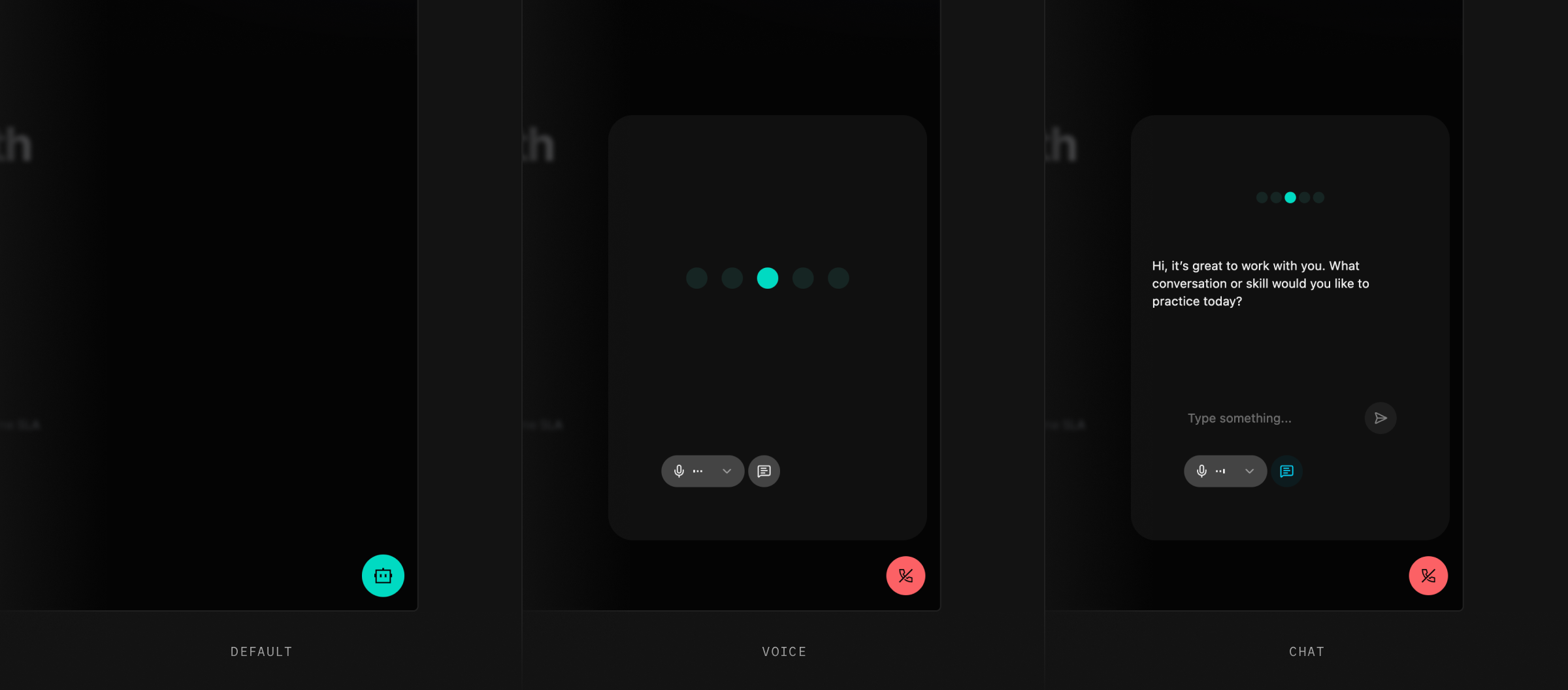
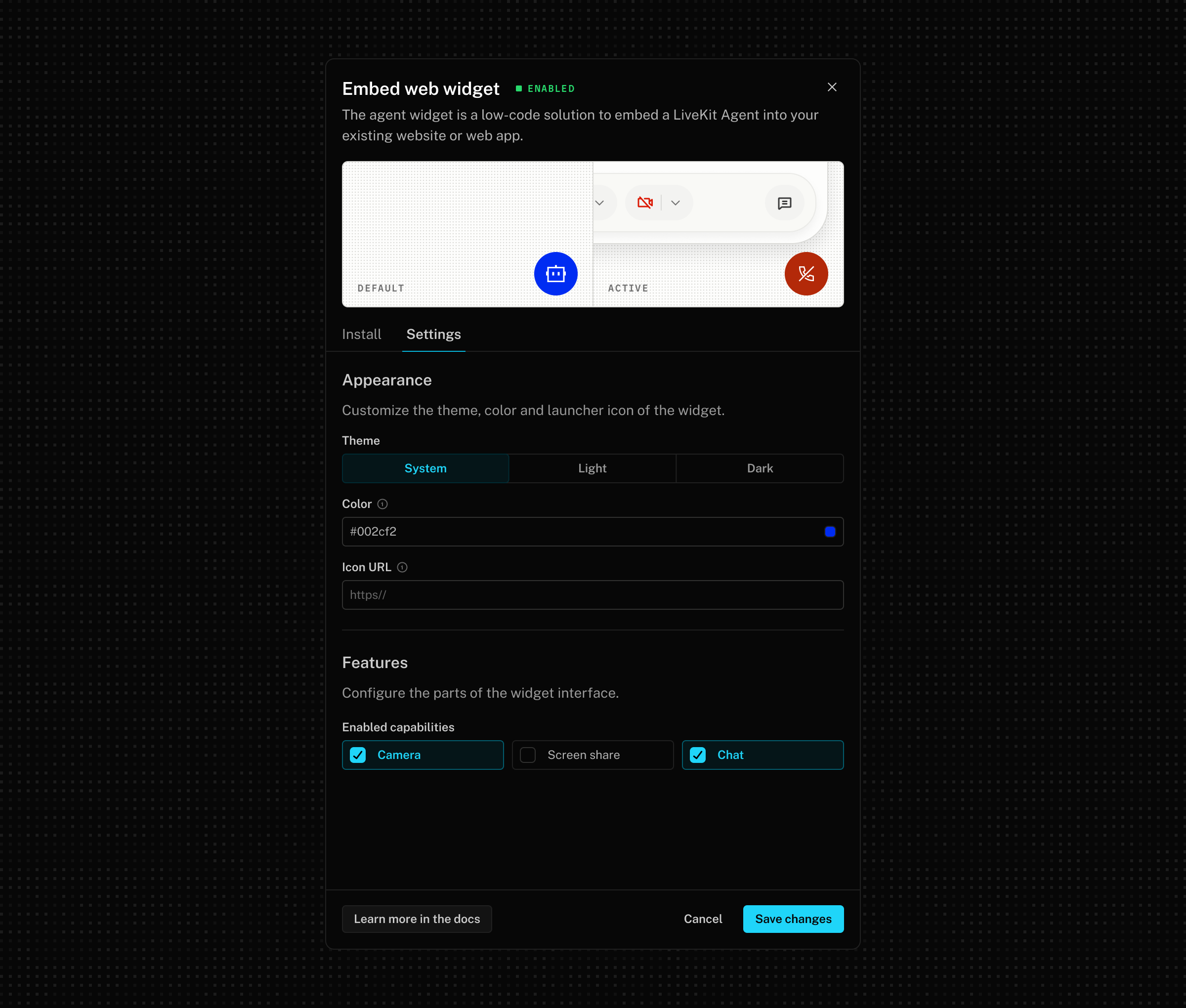
By default the conversation runs over voice. You can also enable video, screen share, and text chat depending on what your agent is meant to do. Video and screen share unlock agents that can see what a user is looking at, which is the difference between "describe your problem" and "let me show you." Text chat works alongside the voice conversation for anything that's easier to type than say: account numbers, links, confirmation codes.
Customize the experience for your users#
Most of the configuration lives in the LiveKit Cloud dashboard, so the widget can fit any site without changes to the snippet.
Branding#
Set an accent color, icon, and theme (light, dark, or system) so the widget looks like part of your site rather than something pasted on top. Settings apply everywhere the widget is embedded, and you can override the visuals per page if you run multiple sites with different brands.
Per-user context#
The widget can carry context about each user into the conversation, so your agent already knows who it's talking to on connect. Pass identity, name, plan tier, support case ID, or any other detail your agent should know up front:
1<script2src="https://cloud.livekit.io/embed-popup.js"3data-lk-agent="CA_abc123"4data-lk-identity="user-abc-123"5data-lk-name="Jane"6data-lk-job-metadata='{"tier":"enterprise","case_id":"CASE-42"}'7></script>
The user gets a personalized greeting and the agent skips the cold-open small talk.
Domain locks and capability enforcement#
Every embed is locked to a list of allowed domains you configure in the dashboard, and capability flags are enforced server-side. The widget won't load on an unapproved domain, and a user inspecting the page can't unlock features you haven't enabled.
Embedded sessions show up alongside your other agent sessions in Agent Console, with the same logs, recordings, analytics, and billing as any other LiveKit session.
Try it today#
Embeddable voice agents are available now in the LiveKit Cloud dashboard. Open your agent, set branding and capabilities, add your allowed domains, and copy the snippet onto your site. If you'd rather not touch your site's source directly, paste the snippet into Claude or Cursor and let your coding assistant install it.
Read the docs for the full reference, including every data-lk-* attribute and how to wire per-user context from your backend. Drop the snippet onto your site, let your agent meet users where they already are, and tell us how it goes in our community.