Voice agents are becoming more common: they take restaurant reservations, dispatch service calls, and field support questions. As callers get more familiar with voice agents, they're also getting sharper at recognizing when a developer picked a default off-the-shelf voice. The default TTS provider voices are good, but they're the same handful of voices showing up everywhere, regardless of whether an agent is booking a haircut or dispatching a tow truck.
A custom voice gives your agent character that fits your brand and the specific job it's doing. You might want a fast, friendly voice for a busy reservation line, something calmer and more patient for an AI receptionist at a doctor's office, or a direct, no-fluff dispatcher for the HVAC company taking emergency calls at 2 am. When the voice fits the situation, callers stop trying to figure out what they're talking to and get on with whatever they called for.
LiveKit Inference gives you the latest voice models with reliable performance, and starting today, you can bring your own voice too: cloned voices are now live on LiveKit Inference.
One voice ID, multiple providers#
A cloned voice is a single voice ID, cloned across multiple TTS providers in one step, and accessible through LiveKit Inference like any other voice. We're launching with all supported TTS models from Cartesia and Inworld, and expanding from there.
When you upload or record an audio sample, we send it to each supported provider in parallel. Each one returns its own voice ID, and we tie them together under a single LiveKit voice ID. Specify the LiveKit voice ID and TTS provider in your agent code or Agent Builder, and your agent will speak with the cloned voice.
Cloning voices across providers unlocks two things you can't get anywhere else.
Listen to your clone on each provider#
Picking the right voice is part art, part trial-and-error. The same audio file cloned on different providers can produce different results, and the underlying models also vary in latency, stability, and prosody. From the LiveKit Cloud dashboard, you can preview your clone across TTS models on each supported provider and pick the one that sounds best for your use case before you ship.
Automatic fallback to the same voice#
What happens when a TTS request fails mid-call? Without cloning, your only option is to fall back to a default voice on a different provider. Your hurried 32-year-old receptionist suddenly becomes a calm British man two sentences in. That's jarring enough that most callers will hang up.
With LiveKit Inference, a failed TTS request automatically falls back to the same cloned voice on a backup provider. There are acoustic differences between providers, but to the caller it sounds like the same person. The conversation keeps going, and most callers won't notice anything happened.
How it works#
Clone a voice in the dashboard#
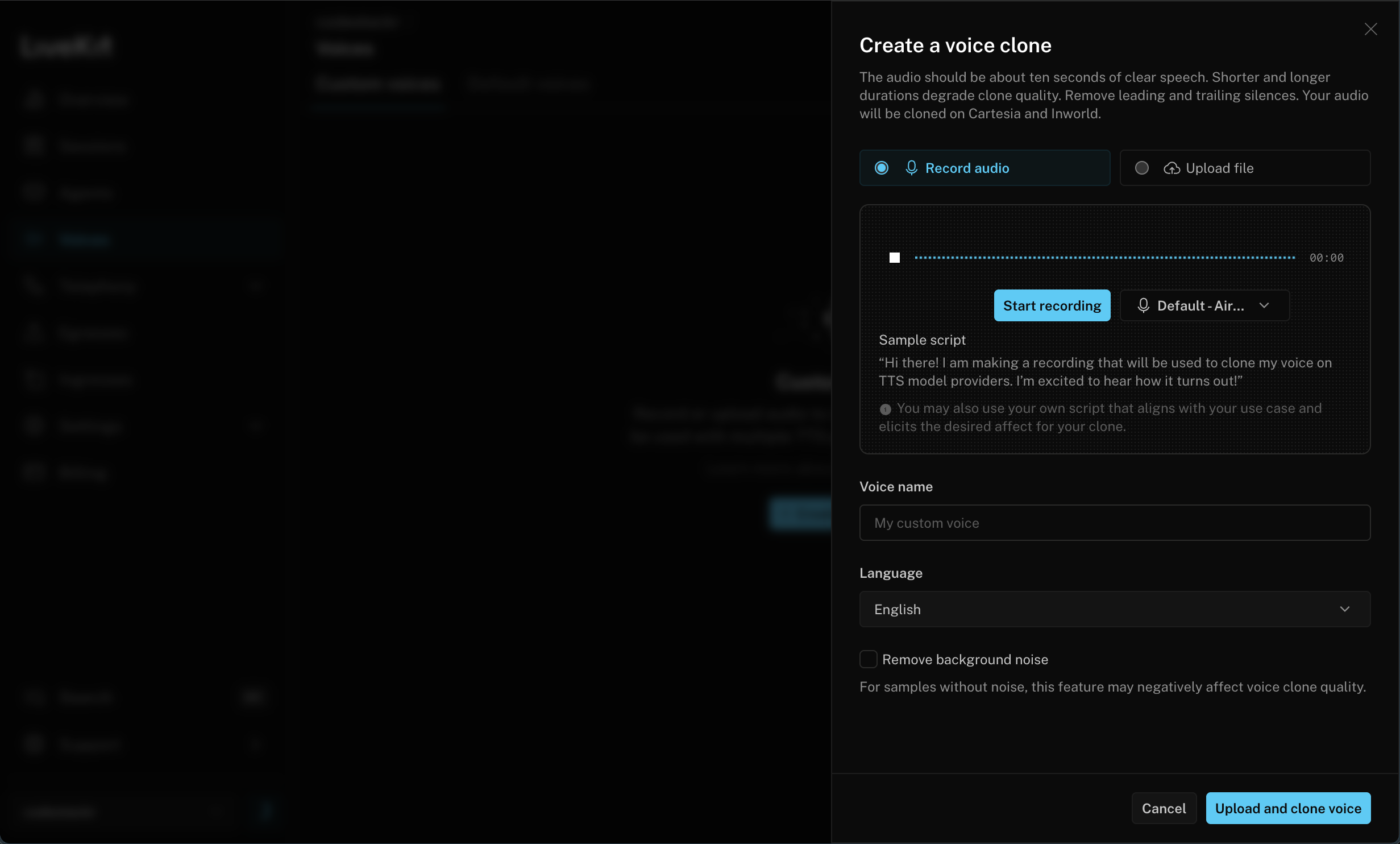
In the LiveKit Cloud dashboard, go to Voices → Custom voices and click Create voice clone. You can record a sample directly in the browser or upload an audio file. We include a suggested script, but you'll get the best clone using audio whose content and tone match your actual use case.
Name the voice, pick the language, and click Upload and clone voice. We send the sample to every supported provider in parallel. In under a minute, your clone is ready to preview and use across multiple models.
Use the cloned voice in LiveKit Agents#
Grab the LiveKit voice ID from the dashboard and drop it into your agent's TTS configuration:
1AgentSession(2stt=inference.STT(model="deepgram/nova-3", language="en"),3llm=inference.LLM(model="openai/gpt-5.2-chat-latest"),4tts=inference.TTS(model="cartesia/sonic-3", voice="v_kiZ6q7GDcY4E",5language="en"6)
LiveKit Inference routes to your chosen provider, falls back to the same cloned voice on another provider if it has to, and consolidates billing through your LiveKit Cloud account.
Use cloned voices in Agent Builder#
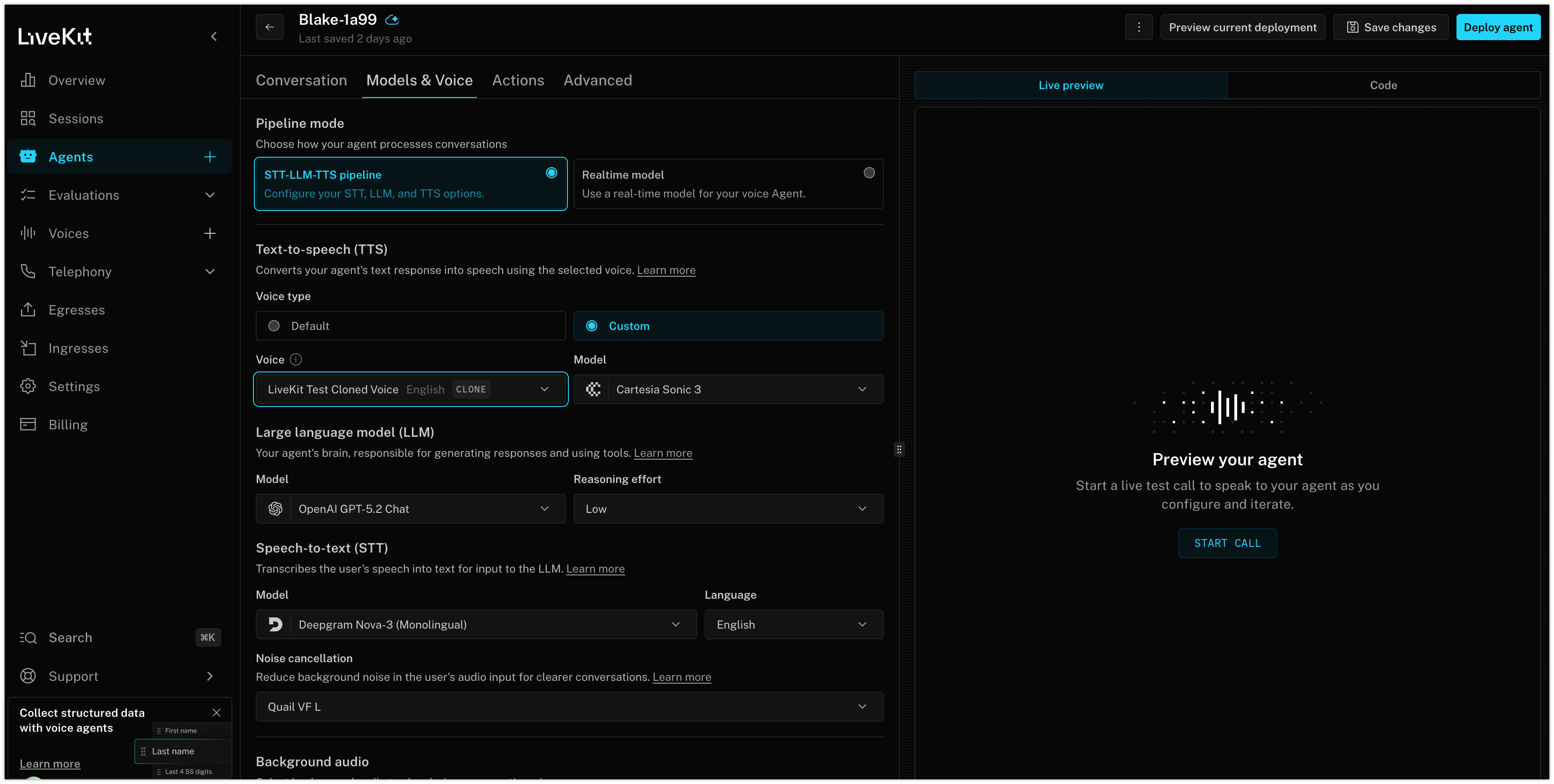
Prototyping in Agent Builder? Open the Models & Voice tab, set voice type to Custom, and pick your cloned voice ID and TTS provider.
Try it today#
Voice cloning is live now on all paid LiveKit Cloud plans. Creating a clone is free, and you pay the provider's standard per-character rate when you use it. There's no cloning surcharge.
We're shipping with Instant Clone Voices today. Pro Clone Voices and Prompt-Designed Voices are coming soon.
Create your first clone in the LiveKit Cloud dashboard and share feedback in the community forums. Clone once, use everywhere, and get built-in resilience for production traffic.