Outbound phone calls don't always reach a human. Voicemail boxes and IVR menus come up far more often than most teams expect, and some lines never stop ringing. An agent only has a few seconds of the call to gather enough context on how to interact.
Today we're bringing Answering Machine Detection (AMD) to LiveKit Agents — available in the core framework with no plugins required. AMD reliably distinguishes humans from machines and classifies every outbound call as human, voicemail, IVR, or unavailable. From there, you decide what happens next: leave a message, navigate a menu, or hang up.
See it in action#
Why AMD matters#
Outbound agents need a reliable verdict on what they're talking to, and they need it within the first second of the call. AMD makes that signal explicit so the rest of your stack can act on it:
- Unambiguous outcomes: Did the call actually reach the person? Without AMD, voicemail pickups are indistinguishable from real conversations in your post-call data, leading to duplicate outreach to people you already reached, or missed follow-ups to people you never did.
- Timing the next step: Detecting a machine isn't the same as knowing when to act on it. AMD surfaces the right moment to leave a voicemail or start navigating an IVR, after the beep or once the prompt finishes, instead of talking over it.
- Preserve context: Your agent prompt shouldn't be stuffed with detection logic. Handling this outside the main loop lets your agents and developers focus on the conversation itself.
- Reduce cost: When an agent doesn't recognize an IVR, it burns tokens and minutes instead of progressing through the menu. AMD lets agents use DTMF to select a branch, leave a pre-recorded voicemail, or hang up early.
Inside Agents AMD#
AMD runs detection outside the agent's main loop: a short-circuiting rule sits in front of an LLM classification step, so easy cases stay fast and only the ambiguous ones pay the cost of a model call.
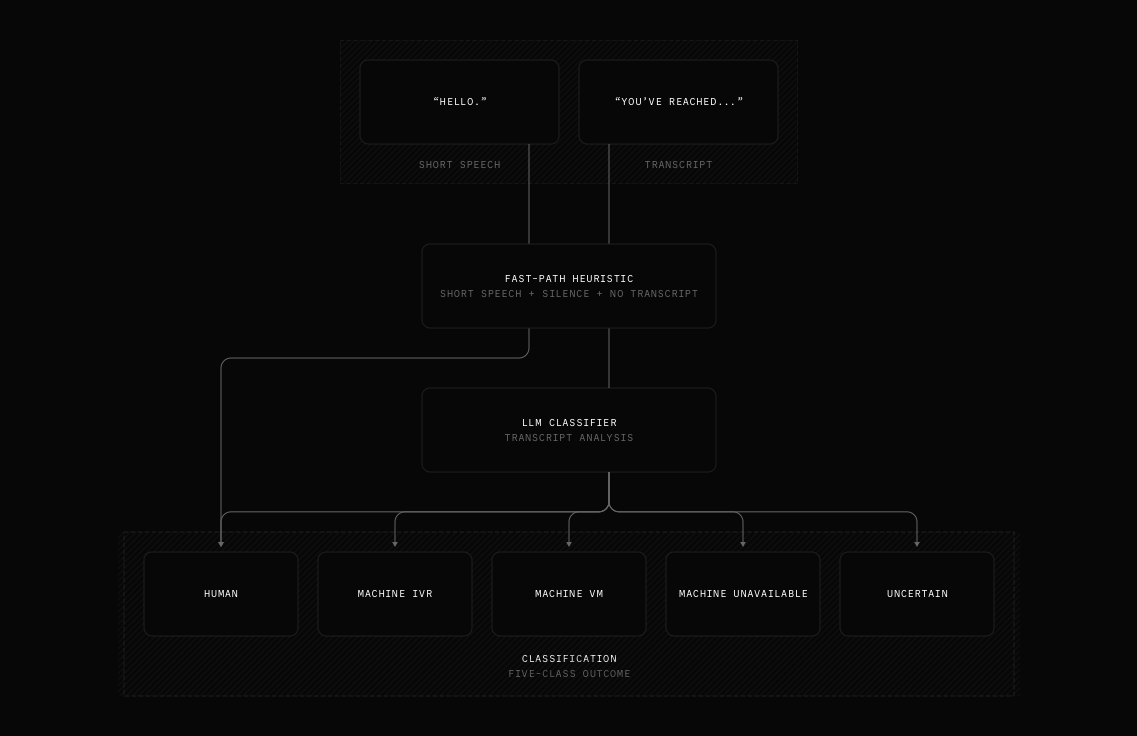
- Transcript available: Whenever your STT pipeline produces a transcript, AMD routes it through the LLM. The transcript is the strongest signal available, and discarding it would hurt accuracy.
- Short utterance, no transcript: For a one-word "hello?", a beep, or silence the STT couldn't resolve, AMD errs on the side of treating the call as human and hands control back to the agent immediately. Misclassifying a human as a machine is the worst-case failure mode, and this keeps time-to-first-response fast: when the caller says "hello?", the agent replies right away.
AMD also exposes a few hooks so it slots cleanly into your existing call flow:
- Auto-IVR navigation lets outbound agents start navigating phone trees the moment an IVR is detected, so the agent doesn't sit idle while menus play. Available in Python today, with JS framework support coming soon.
- Interruption protection ensures voice agents don't continue speaking after a machine is detected, and prevents them from talking over a voicemail beep.
Every setting is tunable, so AMD can be as conservative or as aggressive as your use case requires, from high-volume cold outreach to careful, customer-facing callbacks.
Benchmarks#
We pressure-tested AMD against an internal dataset of voicemails, IVR prompts, and live human pick-ups spanning a range of carriers, languages, and accents. Every LLM and STT combination was scored on both accuracy (F1) and time-to-decision.
The best-performing pairing is google/gemini-3.1-flash-lite with cartesia/ink-whisper, which are our default settings for AMD when LiveKit Cloud is used:
| Class | F1 |
|---|---|
| Human | 95.7% |
| IVR | 98.2% |
| Voicemail | 97.3% |
| Macro F1 | 97.0% |
| Micro F1 (accuracy) | 94.7% |
Macro F1 averages each class equally; micro F1 weights by frequency, so it doubles as overall accuracy.
Median (P50) Time to Detection is 840 milliseconds, measured from the start of the session to the moment a verdict is ready. With preemptive generation enabled, the agent's first reply is generated in parallel, so it can speak the moment AMD confirms a human.
Other combinations such as openai/gpt-4.1 and assemblyai/universal-streaming-multilingual also perform well. If you prefer a different LLM or STT, the documentation lists every evaluated model and how to swap them in with LiveKit Inference,
which offers an easy access to all of them without additional setup. Or you can use plugins to connect to a wide range of providers.
Try it today#
Answering Machine Detection is available in livekit-agents 1.5.9 for Python and 1.4.2 for Node.js. Upgrade your agent to the latest version to get started:
Python
1from livekit import api2from livekit.agents import AMD34await session.start(...)56async with AMD(session, participant_identity=participant_identity) as detector:7# create and wait for the SIP participant8await ctx.api.sip.create_sip_participant(...)9participant = await ctx.wait_for_participant(identity=participant_identity)1011result = await detector.execute()1213# custom logic for each category14if result.category == "human" or result.category == "uncertain":15# let the agent handle the conversation as usual16elif result.category == "machine-ivr":17# IVR navigation runs automatically when `ivr_detection=True` (default)18elif result.category == "machine-vm":19# use say() or generate_reply() to leave a message20speech_handle = session.generate_reply(21instructions=(22"You've reached voicemail. Leave a brief message."23),24)25await speech_handle.wait_for_playout()26elif result.category == "machine-unavailable":27# use ctx.shutdown() to end the call28...
Node.js
1import { voice } from '@livekit/agents';23await session.start({...});45const detector = new voice.AMD(session, { participantIdentity });67try {8// create and wait for the SIP participant9await sip.createSipParticipant(...);10const participant = await ctx.waitForParticipant(participantIdentity);1112const result = await detector.execute();1314// custom logic for each category15if (16result.category === voice.AMDCategory.HUMAN ||17result.category === voice.AMDCategory.UNCERTAIN ||18result.category === voice.AMDCategory.MACHINE_IVR19) {20// let the agent handle the conversation (auto-IVR navigation isn't available in Node.js yet,21// so MACHINE_IVR falls back to the regular agent loop)22} else if (result.category === voice.AMDCategory.MACHINE_VM) {23// use say() or generateReply() to leave a message24const speechHandle = session.generateReply({25instructions:26"You've reached voicemail. Leave a brief message.",27});28await speechHandle.waitForPlayout();29} else if (result.category === voice.AMDCategory.MACHINE_UNAVAILABLE) {30// use session.shutdown() to end the call31}32} finally {33await detector.aclose();34}
Read the documentation for the full reference, including how to configure the classifier, pick models, and hook into each AMD outcome.
Each prediction also surfaces in Agent Console as a new ANSWERING MACHINE DETECTION event, so you can debug AMD alongside the rest of your session. Try it on your outbound agents and let us know how they do in our community.