Voice agents get interesting the moment they remember you. An agent that can answer a question, recall what you told it last week, look up your order, and pick up a conversation where it left off feels less like a demo and more like a product. All of that needs a backend. You need somewhere to store knowledge, memories, profiles, and session history, and a way to search it by meaning.
This post walks through a complete starter that wires a LiveKit Agents voice agent into Supabase. It uses Postgres with pgvector for similarity search, Supabase Auth for real per-visitor identity, Row Level Security as the data-isolation model, and an Edge Function that produces embeddings inside your database, with no third-party embedding provider and no extra API key.
We'll lead with the TypeScript (Node.js) agent, which is the primary runtime in this starter, and there's a fully equivalent Python agent alongside it. Every code excerpt below is pulled straight from the starter so you can follow along in the repo.
What we're building#
The agent demonstrates five Supabase-native patterns:
- RAG over pgvector. Semantic search over a shared knowledge base.
- Agentic memory with Reciprocal Rank Fusion. Per-user memory the agent reads and writes during the conversation, retrieved with hybrid vector + full-text search.
- Pre-loaded user context. The agent loads your profile and prior memories before it says a word.
- Function-tool CRUD. Looking up an order by id, the canonical "call my backend" tool.
- Session report persistence. A structured report written to the database when the call ends.
Here's how the pieces fit together:
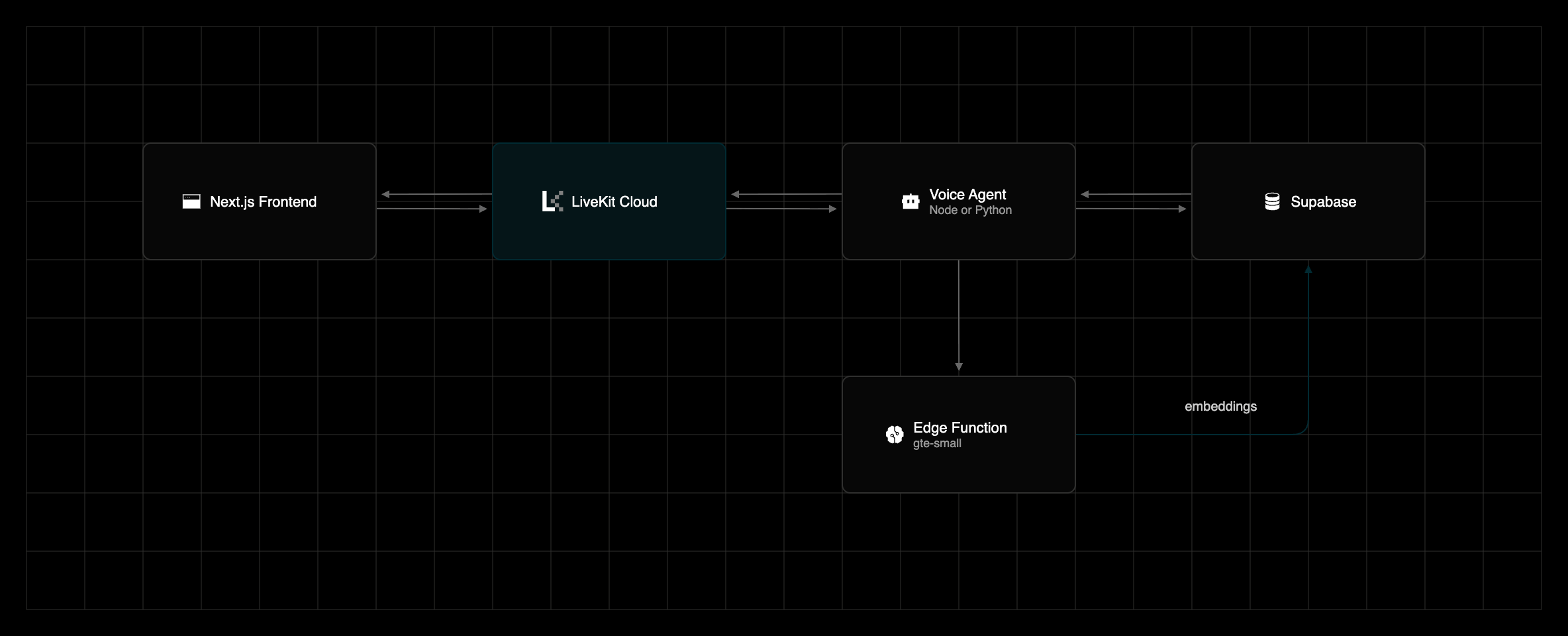
The browser talks to LiveKit Cloud over WebRTC. LiveKit handles speech-to-text, the LLM, and text-to-speech, and your agent is invoked through tool calls. The agent reads and writes Supabase using the project's secret key, and every embedding, for both the seed data and live queries, comes from the embed Edge Function running the gte-small model right inside Supabase.
The Supabase-native wins#
Before the code, it's worth calling out why Supabase is a strong fit for a voice agent, because the architecture leans on each of these:
- Real identity with zero friction. Supabase Auth anonymous sign-ins give every visitor a genuine
auth.usersrow and a JWT without asking for an email. You get a real user id to scope data by, and a clean upgrade path to a permanent account later. - RLS is the security model. Row Level Security policies (
auth.uid() = user_id) mean the browser physically cannot read another user's memories. The database enforces it, not your application code. - Vector search is just Postgres. pgvector adds a
vector(384)column type and an<=>cosine-distance operator. An HNSW index makes nearest-neighbour lookups fast, and it lives in the same table as the rest of your data. - Hybrid search via Reciprocal Rank Fusion. Postgres ships full-text search (
tsvector) in the box. Fusing it with vector search inside a single SQL function gives you retrieval that's better than either branch alone. - Embeddings inside the database. A Supabase Edge Function runs
gte-smallon Supabase's own inference runtime, so embeddings are one HTTP call away and there's no separate provider to sign up for or bill. - Modern API keys. The starter uses Supabase's current publishable / secret keys (
sb_publishable_…in the browser,sb_secret_…on the server) rather than the legacyanon/service_roleJWTs.
Prerequisites#
- Node.js 22+ and pnpm 10+
- A Supabase project (pgvector and the
gte-smallinference model are available on the free tier) plus the Supabase CLI - A LiveKit Cloud project
- Python 3.11+ and uv, only if you want to run the Python agent
Identity: anonymous auth + RLS#
Most "who is the user?" stories for agents involve a homemade cookie and a lot of trust. This starter uses real auth instead, and the chain of custody is short and verifiable.
1. The browser signs in anonymously on load. A small hook checks for an existing session and, if there isn't one, mints a real user with signInAnonymously():
1// frontend/hooks/useSupabaseSession.ts2const { data: { session } } = await supabase.auth.getSession();34if (!cancelled && !session) {5const { error } = await supabase.auth.signInAnonymously();6if (error) {7console.error('Supabase anonymous sign-in failed:', error.message);8}9}
This creates a genuine auth.users row and a JWT, with no email and no password, so the rest of the system has a real user.id to work with. The browser client uses the publishable key and is fully constrained by RLS:
1// frontend/lib/supabase/client.ts2export function createClient() {3return createBrowserClient(4process.env.NEXT_PUBLIC_SUPABASE_URL!,5process.env.NEXT_PUBLIC_SUPABASE_PUBLISHABLE_KEY!6);7}
2. The server is the sole authority for identity. When the frontend asks for a LiveKit token, the route verifies the Supabase session server-side and reads the user id from the verified user, never from the request body:
1// frontend/app/api/token/route.ts2const supabase = createServerClient(SUPABASE_URL, SUPABASE_PUBLISHABLE_KEY, {3cookies: { /* read req cookies, collect rotated ones */ },4});56const { data: { user }, error } = await supabase.auth.getUser();7if (error || !user) {8return new NextResponse('Unauthorized: no valid Supabase session', { status: 401 });9}1011// The verified Supabase user id (= auth.uid()) is the sole identity.12const userId = user.id;13const metadata = JSON.stringify({ user_id: userId });14const roomConfig = AGENT_NAME15? new RoomConfiguration({16agents: [new RoomAgentDispatch({ agentName: AGENT_NAME, metadata })],17})18: new RoomConfiguration();
The verified id rides to the agent through agent dispatch metadata.
3. The agent scopes every query by that id. It connects with the secret key, which bypasses RLS, so the discipline of always filtering by the server-verified user_id is what keeps users isolated on the backend. RLS, meanwhile, protects the browser, where untrusted code runs.
The result is two independent layers of protection. RLS makes it impossible for the browser to read someone else's rows, and the token route makes it impossible for a client to claim an id it didn't earn. The policies are plain SQL:
1-- supabase/migrations/0001_init.sql2create policy "memories_select_own"3on public.memories for select4to authenticated5using (auth.uid() = user_id);
A signup trigger gives every new auth user a profile row automatically, including anonymous ones:
1create or replace function public.handle_new_user()2returns trigger3language plpgsql4security definer5set search_path = public6as $$7begin8insert into public.profiles (id, email)9values (new.id, new.email)10on conflict (id) do nothing;11return new;12end;13$$;1415create trigger on_auth_user_created16after insert on auth.users17for each row execute function public.handle_new_user();
Pattern 1: RAG over pgvector#
The knowledge base is a single table with a 384-dimensional embedding column and an HNSW index for fast cosine search:
1create table public.knowledge (2id bigint generated always as identity primary key,3title text,4content text not null,5category text,6embedding vector(384),7created_at timestamptz not null default now()8);910create index knowledge_embedding_hnsw11on public.knowledge12using hnsw (embedding vector_cosine_ops);
Retrieval is a small SQL function that embeds the query, orders by cosine distance (<=>), and takes the top k:
1create or replace function public.match_knowledge(2query_embedding vector(384),3match_count int default 34)5returns table (title text, content text)6language sql7security invoker8set search_path = public9as $$10select k.title, k.content11from public.knowledge k12where k.embedding is not null13order by k.embedding <=> query_embedding asc14limit greatest(match_count, 1);15$$;
On the agent side, the search_knowledge tool embeds the user's question and calls the RPC:
1// agent-ts/src/agent.ts2export async function vectorSearchKnowledge(3supabase: SupabaseClient,4query: string,5limit = 3,6): Promise<KnowledgeHit[]> {7const queryEmbedding = await embedText(query);8const { data, error } = await supabase.rpc('match_knowledge', {9query_embedding: queryEmbedding,10match_count: limit,11});12if (error) {13throw new Error(`Knowledge search failed: ${error.message}`);14}15return (data ?? []) as KnowledgeHit[];16}
Voice has one nice touch worth calling out. Knowledge lookups can take a beat, and silence feels broken to a user, so the tool kicks off a brief "I'm looking that up" reply if the search runs past 500 ms, keeping the agent conversational while pgvector works.
Pattern 2: agentic memory with reciprocal rank fusion#
Each memory lives in a slot, one row per (user_id, memory_type), so writing favorite_color twice replaces the old value rather than piling up duplicates. The UNIQUE constraint plus an upsert makes that a one-liner. The table carries both an embedding for semantic search and a generated tsvector for full-text search:
1create table public.memories (2id bigint generated always as identity primary key,3user_id uuid not null references auth.users (id) on delete cascade,4memory_type text not null,5content text not null,6embedding vector(384),7fts tsvector generated always as (8to_tsvector('english',9coalesce(memory_type, '') || ' ' || coalesce(content, ''))10) stored,11created_at timestamptz not null default now(),12updated_at timestamptz not null default now(),13unique (user_id, memory_type)14);
Writing a memory is an upsert keyed on the slot:
1// agent-ts/src/tools/memory.ts2const { error } = await supabase3.from('memories')4.upsert(row, { onConflict: 'user_id,memory_type' });
The interesting part is retrieval. Pure vector search is great at meaning (asking "what does the user like to drink?" can surface a stored "oat-milk latte") but can whiff on short, literal values. Pure text search nails the literal hits but misses paraphrases. So the starter fuses both with Reciprocal Rank Fusion, ranking each branch independently, then combining with weight / (k + rank) and sorting by the fused score. It all happens in one SQL function, scoped to the user:
1create or replace function public.match_memories_hybrid(2query_embedding vector(384),3query_text text,4p_user_id uuid,5match_count int default 56)7returns table (memory_type text, content text)8language sql9security invoker10set search_path = public11as $$12with vector_ranked as (13select m.id,14row_number() over (order by m.embedding <=> query_embedding asc) as rank15from public.memories m16where m.user_id = p_user_id and m.embedding is not null17order by m.embedding <=> query_embedding asc18limit least(greatest(match_count, 1) * 4, 50)19),20text_ranked as (21select m.id,22row_number() over (23order by ts_rank_cd(m.fts, websearch_to_tsquery('english', query_text)) desc24) as rank25from public.memories m26where m.user_id = p_user_id27and m.fts @@ websearch_to_tsquery('english', query_text)28order by ts_rank_cd(m.fts, websearch_to_tsquery('english', query_text)) desc29limit least(greatest(match_count, 1) * 4, 50)30),31fused as (32select coalesce(v.id, t.id) as id,33coalesce(0.7 / (60 + v.rank), 0.0)34+ coalesce(0.3 / (60 + t.rank), 0.0) as score35from vector_ranked v36full outer join text_ranked t on v.id = t.id37)38select m.memory_type, m.content39from fused f40join public.memories m on m.id = f.id41order by f.score desc42limit greatest(match_count, 1);43$$;
The agent exposes five memory tools (remember_detail, recall_detail, forget_detail, search_memories, and list_user_memories), and search_memories calls the hybrid RPC:
1const { data, error } = await supabase.rpc('match_memories_hybrid', {2query_embedding: queryEmbedding,3query_text: query,4p_user_id: userId,5match_count: limit,6});
There's a deliberate bit of resilience here too. If embedding the query ever fails, the tool degrades to a text-only scan over the generated fts column instead of dropping the request. Memory should be the last thing to break.
Pattern 3: pre-loaded user context#
A returning user shouldn't have to reintroduce themselves. Before the agent speaks, it stamps last_seen_at, reads back the profile, and appends any remembered facts, all as assistant messages so the model sees them on its very first turn:
1// agent-ts/src/preload.ts2export async function preloadUser(userId: string): Promise<llm.ChatContext> {3const supabase = getSupabase();4const now = new Date().toISOString();56const { data: profile } = await supabase7.from('profiles')8.upsert({ id: userId, last_seen_at: now }, { onConflict: 'id' })9.select('id, name, email, preferences')10.maybeSingle();1112const chatCtx = new llm.ChatContext();13// ... add a profile summary message ...1415const memories = await listMemories(supabase, userId);16if (memories.length > 0) {17const lines = memories.map((m) => `- ${m.memory_type}: ${m.content}`).join('\n');18chatCtx.addMessage({19role: 'assistant',20content: `Remembered facts from prior sessions:\n${lines}`,21});22}23return chatCtx;24}
Timing matters for latency. The agent resolves the user id from dispatch metadata before connecting to the room, so the preload query runs in parallel with the WebRTC connection rather than after it:
1// agent-ts/src/main.ts2const userId = resolveUserId(ctx.job.metadata);3ctx.proc.userData.user_id = userId;45const initialChatCtx = await preloadUser(userId);6// ... build the AgentSession ...7await ctx.connect();
resolveUserId reads user_id from the metadata and falls back to DEMO_USER_ID when there isn't any, which is exactly the case when you're testing locally without the frontend (more on that below).
Pattern 4: function-tool CRUD#
This is the "call my backend" pattern, and it's intentionally plain, just a tool that reads a row by a business key. Orders are shared demo data (readable by any authenticated visitor) and looked up by order_id:
1lookup_order: llm.tool({2description: 'Look up an order by its ID. Returns items, total, and status.',3parameters: z.object({4order_id: z.string().describe('The order ID to look up.'),5}),6execute: async ({ order_id }) => {7const supabase = getSupabase();8const { data: order, error } = await supabase9.from('orders')10.select('order_id, items, total, status')11.eq('order_id', order_id)12.maybeSingle();13if (error) {14throw new llm.ToolError(`Failed to look up order ${order_id}: ${error.message}`);15}16if (!order) {17throw new llm.ToolError(`Order ${order_id} not found.`);18}19return JSON.stringify(order);20},21}),
Swap orders for any table in your domain and you've got the shape for inventory checks, account lookups, booking status, and anything else the agent needs to fetch on demand.
Pattern 5: session report persistence#
When a call ends, the agent writes a structured report to the sessions table from a shutdown callback. Because the agent holds the secret key, the insert succeeds even though sessions has no insert policy for end users, so only the backend can write session history:
1// agent-ts/src/main.ts2ctx.addShutdownCallback(async () => {3try {4const report = ctx.makeSessionReport(session);5const supabase = getSupabase();6const { error } = await supabase.from('sessions').insert({7session_id: ctx.room.name,8user_id: ctx.proc.userData.user_id,9room_name: ctx.room.name,10report: voice.sessionReportToJSON(report),11});12if (error) throw new Error(error.message);13console.info(`Persisted session report for ${ctx.room.name}`);14} catch (err) {15console.error('Failed to persist session report', err);16}17});
The owner-only SELECT policy means a user can later read their own session history through the browser, but the writes stay locked to the backend.
Embeddings inside Supabase: the embed edge function#
Every embedding in the starter, for seed data and for live queries alike, comes from one place. A Supabase Edge Function runs gte-small on Supabase's built-in inference runtime. Defining the model and dimensions in exactly one spot keeps the seed script and both agent runtimes in sync.
1// supabase/functions/embed/index.ts2const session = new Supabase.ai.Session('gte-small');34Deno.serve(async (req: Request): Promise<Response> => {5// ... validate method + auth + body ...6const inputs = Array.isArray(input) ? input : [input];78const embeddings: number[][] = [];9for (const text of inputs) {10const embedding = (await session.run(text, {11mean_pool: true,12normalize: true,13})) as number[];14embeddings.push(embedding);15}16return json({ embeddings }, 200);17});
It takes { input: string | string[] } and always returns { embeddings: number[][] }, one 384-dim, unit-length vector per input, ready for cosine distance. Callers hit it over plain HTTP:
1// agent-ts/src/tools/embeddings.ts2const response = await fetch(functionUrl(), {3method: 'POST',4headers: {5apikey: key,6Authorization: `Bearer ${key}`,7'Content-Type': 'application/json',8},9body: JSON.stringify({ input }),10});
Authorization is worth a note, because it trips people up. Supabase's modern API keys (sb_publishable_… / sb_secret_…) are not JWTs, so the platform's built-in verify_jwt gateway check can't validate them. Per the Supabase docs, you deploy the function with verify_jwt = false and authorize the request yourself, here by requiring the secret key on the apikey header:
1supabase functions deploy embed --no-verify-jwt
That keeps the endpoint from being trivially open. For production you'd harden further. The function supports an EMBED_SECRET for an exact-match check, and you can layer on network or rate-limit policies.
Setup#
From the repo root:
1pnpm setup # installs packages, copies .env.local files23# link the Supabase CLI to your project once4supabase link --project-ref <your-project-ref>56pnpm db:migrate # apply schema, RLS, RPCs, indexes, triggers7pnpm db:deploy-functions # deploy the gte-small `embed` Edge Function8pnpm db:seed # knowledge docs, orders, and a demo user
There are two things to do in the Supabase dashboard. First, enable Anonymous sign-ins under Authentication → Providers, since the frontend depends on it. Second, grab your keys from Project Settings → API Keys (the Publishable and Secret tabs). The secret key goes in the agent and db env files, and the publishable key goes in the frontend.
pnpm db:seed creates a demo auth user and prints its UUID:
1// db/seed.ts2console.info('Copy the following into agent-ts/.env.local and agent-py/.env.local:');3console.info(`DEMO_USER_ID=${demoUserId}`);
Copy that into DEMO_USER_ID so local runs have a user to preload. Knowledge and orders are shared demo data that work for any visitor. Profiles, memories, and sessions start empty for a real anonymous visitor and fill in as they talk.
Running and testing#
Start the agent and the frontend together:
1pnpm dev:ts # Node agent (dev mode) + frontend
To test the agent on its own, run it in dev mode and connect from the hosted Agent Console in the LiveKit Cloud dashboard, a browser-based console that talks to your locally running agent with no custom frontend required:
1pnpm dev:ts # then, in LiveKit Cloud: Agents → Launch Console
Set the Agent name to my-agent and start talking. Because there's no frontend in this flow, there's no dispatch metadata, so the agent falls back to DEMO_USER_ID for the preload path, which is exactly why the seed script prints it. The Agent Console works with locally running agents on the current SDKs (Node ≥ 1.2.4, and this starter uses 1.4.5).
The Python agent#
The starter ships a fully equivalent Python agent at agent-py/, built on supabase-py and the same Canonical Contract, with identical tables, RPCs, and the shared embed function. It registers under the same my-agent name, so run one runtime at a time. The patterns map cleanly onto the Python SDK's @function_tool decorators:
1# agent-py/src/agent.py2@function_tool()3async def lookup_order(self, context: RunContext, order_id: str) -> str:4client = await get_client()5# ... select from orders by order_id ...67@function_tool()8async def search_knowledge(self, context: RunContext, query: str) -> str:9client = await get_client()10results = await _search_knowledge(client, query, limit=3)11# ...
If you prefer Python, it's a first-class path. As a bonus, the Python SDK has a built-in terminal console (pnpm agent:py:console) that runs the agent entirely in your terminal, handy for quick iteration without a browser.
Next steps#
This starter is intentionally minimal so it's easy to build on. A few natural directions:
- Upgrade anonymous users to real accounts. An anonymous session can be promoted in place with
supabase.auth.updateUser({ email, password })orlinkIdentity(), and theuser_idis preserved, so every memory and profile field carries over. Wire it into the frontend when a visitor wants to come back as themselves. - Add multi-tenancy. Introduce an
org_idcolumn, extend the RLS policies to scope by organization as well as user, and pass the tenant through the same verified dispatch-metadata path. - Harden the
embedfunction. Set a dedicatedEMBED_SECRETfor an exact-match check, restrict who can invoke it, and add rate limiting before you point production traffic at it. - Swap in a different embedding model. Change the model in the
embedfunction andEMBEDDING_DIMENSIONSin the agent, then update thevector(N)columns and HNSW indexes to match. A local or larger model is a one-function change because embeddings are centralized.
Wrapping up#
With Supabase behind it, a voice agent gets real identity (anonymous auth), real isolation (RLS), real retrieval (pgvector + RRF hybrid search), and a place to remember things, all without standing up a separate vector database or embedding service. The five patterns here cover the parts most agents need, namely knowledge, memory, context, backend calls, and history.
Clone the starter, point it at a Supabase project and a LiveKit Cloud project, run pnpm dev:ts, and start talking. Then make it yours. The schema, tools, and instructions are all a few lines of edits away.
Get started with LiveKit#
Ready to build your own voice agent? Sign up for a free LiveKit Cloud account to get model inference, agent deployment, and realtime transport in one place, then point this starter at your project and start talking.