Voice agents
Voice agents are AI-powered systems that understand speech, think intelligently, and respond with natural-sounding voice in real time. Build, test, and deploy production voice agents with LiveKit's open source framework and cloud infrastructure.
Voice agents are changing how people interact with software. From AI assistants that handle customer calls to systems that book appointments and qualify leads, voice agents are becoming the go-to interface between businesses and their users.
But what exactly is a voice agent? How does it differ from a chatbot or a traditional phone tree? And how do you build one that actually feels natural to talk to?
This guide covers everything developers need to know about voice agents, from how they work and when to use them, to how to start building with LiveKit.
This guide is written by the LiveKit team, who maintain one of the most widely used open-source real-time communication stacks and power production voice agents across telephony, support, and AI platforms.
What is a voice agent?Link to this section
A voice agent is an AI-powered system that understands spoken language, processes it intelligently, and responds with natural-sounding speech in real time.
Unlike traditional voice systems that follow rigid scripts, modern voice agents use large language models (LLMs) to understand context, handle unexpected questions, and carry on natural conversations.
In simple terms. A voice agent is an AI you can talk to like a human.
Key characteristics of voice agentsLink to this section
- Real-time conversation with response times around 1 second or less for natural dialogue.
- Context awareness that tracks and remembers conversation history.
- Natural language understanding that handles varied phrasing, accents, and interruptions.
- Dynamic responses generated in context rather than played from pre-recorded audio.
- Action capabilities like booking appointments, looking up information, or transferring calls.
How do voice agents work?Link to this section
Every voice agent follows the same basic architecture. A three-stage pipeline converts speech to text, processes it with an LLM, and converts the response back to speech.
The voice agent pipelineLink to this section
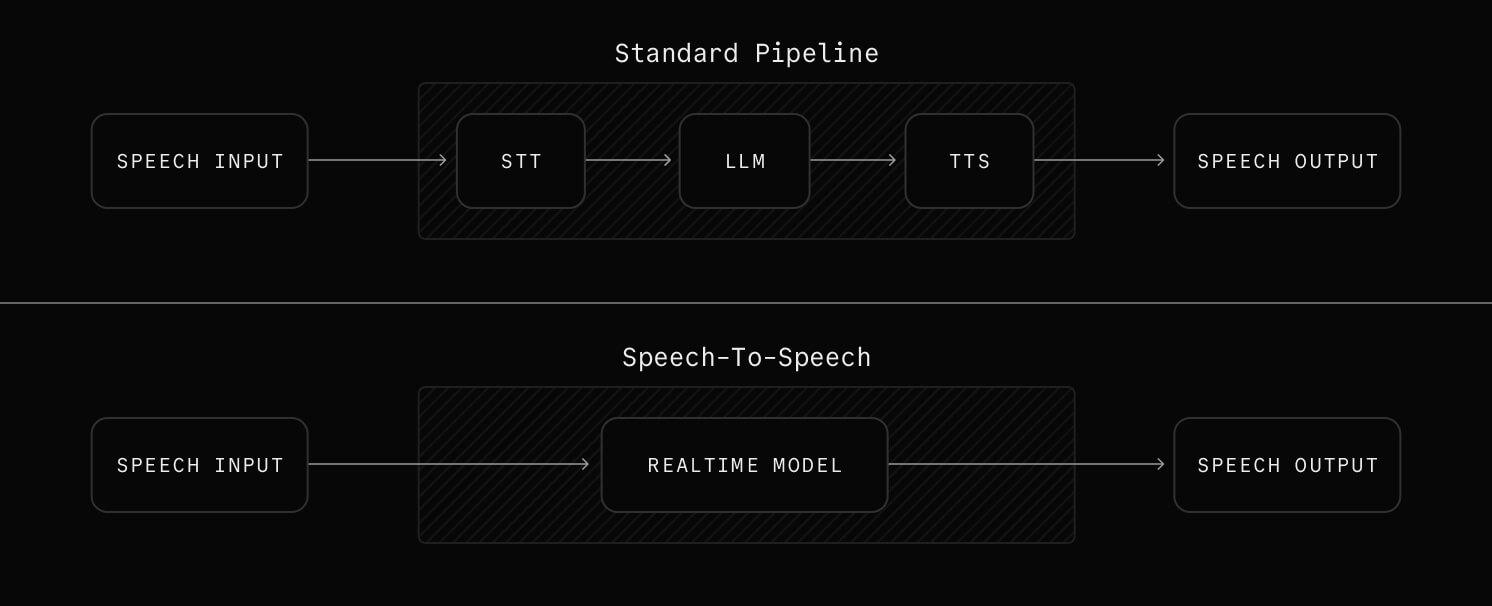
Stage 1. Speech-to-Text (STT)Link to this section
The STT component converts spoken words into text. Modern STT systems like Deepgram, AssemblyAI, and Cartesia can transcribe speech in real time with sub-300ms latency. They handle multiple languages and accents, filter background noise, and detect when the user has finished speaking through end-of-utterance detection.
Stage 2. LLM processingLink to this section
The transcribed text goes to a large language model (like GPT, Claude, or Llama) that understands the user's intent, maintains conversation context, generates an appropriate response, and decides if any actions need to be taken through function calling.
Stage 3. Text-to-Speech (TTS)Link to this section
The LLM's text response is converted to natural-sounding audio using TTS providers like Cartesia, Rime, or ElevenLabs. Modern TTS engines generate human-like speech with emotion and inflection, stream audio in real time without waiting for full generation, support custom voice cloning for brand consistency, and work across multiple languages.
Speech-to-speech modelsLink to this section
A newer approach bypasses the traditional pipeline entirely. Speech-to-speech models (also called realtime models) accept audio input and produce audio output directly, without a separate STT or TTS step. This can reduce latency and preserve more vocal nuance, though the technology is still maturing and offers less control over individual pipeline stages.
For a detailed breakdown of pipeline architectures, latency optimization, and scaling patterns, see the Voice Agent Architecture Guide.
The challenges of building voice agentsLink to this section
The pipeline above only tells half the story. Getting each stage to work together reliably at scale is where things get hard.
Latency and transport. Conversational turn-taking breaks down above roughly 1-2 seconds of total latency. Users start talking over the agent, creating a frustrating experience. WebRTC is the gold standard for real-time audio transport because it was built for low-latency communication, with built-in echo cancellation, network adaptation, and NAT traversal. WebSockets (500ms-1.5s) and HTTP streaming (2-5 seconds) introduce too much delay for real conversation.
Turn-taking and interruptions. Knowing when the user has finished speaking and when they're just pausing is one of the hardest problems in voice AI. Agents need to detect end-of-utterance accurately and handle "barge-in" (when the user interrupts mid-response) without losing context. The Turn Detection for Voice Agents Guide covers the full range of detection approaches and how each one affects latency.
Orchestration and reliability. Coordinating STT, LLM, and TTS providers in real time means handling failures, retries, and provider-specific quirks. At production scale, you also need to manage concurrency, graceful degradation, and observability across every stage of the pipeline.
Background noise. Real-world audio is messy. Background voices, music, and ambient noise can confuse STT models and degrade the entire experience. Noise cancellation and background voice filtering are not optional for production voice agents.
Voice agents vs. chatbots vs. IVRLink to this section
Voice agents are often confused with chatbots and IVR (Interactive Voice Response) systems. Here's how they compare.
Traditional IVRLink to this section
- Pre-recorded prompts with DTMF (telephone keypad tones) or basic speech recognition.
- Rigid decision trees that can't handle unexpected questions.
- Works well for simple call routing, authentication, and account lookups.
Text chatbotsLink to this section
- Text-based AI conversation through web chat, SMS, or messaging apps.
- Can use LLMs for intelligent responses.
- Best for support tickets, async communication, and documentation lookup.
Voice agentsLink to this section
- Real-time spoken conversation powered by LLMs.
- Handles open-ended questions, context, and interruptions naturally.
- Best for phone calls, hands-free interfaces, and high-touch interactions.
| Feature | IVR | Chatbot | Voice agent |
|---|---|---|---|
| Input | Speech/keypad | Text | Speech |
| Output | Pre-recorded audio | Text | Generated speech |
| Intelligence | Rule-based | AI-powered | AI-powered |
| Latency tolerance | High | High | Low |
| Handles interruptions | No | N/A | Yes |
| Context awareness | Limited | Yes | Yes |
| Setup complexity | Low | Medium | Medium-High |
What can you build with voice agents?Link to this section
Voice agents are being deployed across industries. Here are the most common use cases.
Customer service and supportLink to this section
- Answer customer questions 24/7 without hold times.
- Resolve common tier-1 issues before escalating to humans.
- Look up and communicate order status, returns, and exchanges.
- Guide customers through troubleshooting and self-service flows.
Sales and lead qualificationLink to this section
- Reach out to leads at scale with outbound calls.
- Ask discovery questions and score leads automatically.
- Book meetings directly on sales reps' calendars.
- Re-engage prospects who haven't responded to follow-ups.
HealthcareLink to this section
- Schedule, reschedule, and confirm appointments.
- Handle prescription refill requests and pharmacy coordination.
- Provide preliminary symptom triage before routing to care.
- Check in on patients after visits.
Financial servicesLink to this section
- Answer account inquiries like balance checks, transaction history, and payment dates.
- Verify suspicious transactions in real time for fraud detection.
- Guide customers through loan and application processes.
- Handle payment arrangements and collection reminders.
Hospitality and travelLink to this section
- Book hotels, restaurants, and activities.
- Answer guest questions and fulfill concierge requests.
- Provide real-time updates on flight delays, gates, and rebooking options.
- Collect post-stay feedback and handle loyalty program inquiries.
Education and trainingLink to this section
- Deliver personalized tutoring and practice sessions on demand.
- Quiz learners and provide instant feedback on their responses.
- Guide new employees through onboarding and compliance training.
- Answer questions about course material and direct learners to the right resources.
Why build voice agents with LiveKit?Link to this section
LiveKit gives you everything you need to build, test, and ship production voice agents.
Open source frameworkLink to this section
LiveKit's Agents framework is fully open source and backed by a large developer community. You can build with full visibility into how the framework works, contribute improvements, and avoid vendor lock-in. The framework supports Python and TypeScript, with first-class support for the entire STT → LLM → TTS pipeline.
Production tested at scaleLink to this section
LiveKit's real-time infrastructure handles millions of audio sessions. The same cloud platform powering production voice agents also runs video, data, and streaming workloads for companies across industries. You get battle-tested reliability without building and maintaining your own media infrastructure.
Built-in intelligenceLink to this section
Turn detection, noise cancellation, and background voice filtering come built into the framework. You don't need to stitch together separate services for end-of-utterance detection or audio cleanup. LiveKit handles these out of the box so your agents sound great in real-world environments.
Unified model accessLink to this section
LiveKit works with all major STT, LLM, and TTS providers through a plugin system. Swap models in and out with a few lines of code. Use Deepgram for STT, OpenAI for your LLM, and Cartesia for TTS, then switch to different providers without rewriting your agent logic.
Telephony integrationLink to this section
Connect your voice agents to phone networks with built-in SIP trunking support. LiveKit handles PSTN connectivity, call routing, and the complexities of bridging traditional telephony with real-time AI so your agents can make and receive actual phone calls.
Observability built inLink to this section
Monitor every stage of the voice pipeline with built-in metrics for STT, LLM, and TTS performance. Track latency, error rates, and usage across providers. Debug issues faster with tracing that follows a conversation from the first spoken word to the final response.
How to get started with voice agentsLink to this section
Building your first voice agent takes just a few steps. Here's the fastest path from zero to a working agent.
Test in ConsoleLink to this section
Agent Console lets you test and debug cloud-deployed voice agents in your browser. Start a session, inspect realtime events, and iterate on agent behavior from LiveKit Cloud.
Follow the quickstartLink to this section
The Voice Agent Quickstart walks you through building your first agent in under 10 minutes. You'll set up a project, install the Agents framework, and have a working voice agent running locally. For a more comprehensive walkthrough that covers model selection, testing, and deployment, see Building a Voice AI Agent.
Build a production voice agentLink to this section
Once you've got the basics, check out these guides to go deeper.
- Voice Agent Architecture Guide for understanding how all the pieces fit together
- Turn Detection for Voice Agents Guide for handling interruptions and natural conversation flow
- Building a Voice AI Agent for a complete walkthrough of building an agent in Python
Deploy to LiveKit CloudLink to this section
When you're ready to go live, create a LiveKit Cloud project and deploy your agent. LiveKit Cloud handles scaling, global distribution, and infrastructure management so you can focus on your agent's behavior and user experience.
Frequently asked questionsLink to this section
What is the difference between voice agents and chatbots?
Chatbots communicate through text. Voice agents communicate through spoken audio in real time. This requires handling speech recognition, natural speech synthesis, turn-taking, and latency management that text chat does not involve.
What is the difference between a voice agent and a voice assistant?
The terms are often used interchangeably. "Voice assistant" typically refers to consumer products like Siri or Alexa, while "voice agent" usually describes AI systems built for specific business applications like customer service or sales.
What models do I need to build a voice agent?
A typical voice agent uses three models. Speech-to-text (STT) handles transcription, a large language model (LLM) handles reasoning and response generation, and text-to-speech (TTS) handles voice output. Alternatively, you can use speech-to-speech models that handle input and output audio directly.
How fast do voice agents need to respond?
Around 1 second or less from when the user stops speaking to when the agent starts responding. Longer delays make conversations feel unnatural. This is called "end-to-end latency" and it is the primary constraint in voice agent design.
What is the minimum latency achievable for voice agents?
With optimized infrastructure, end-to-end latency around 1 second is achievable for most production deployments.
- STT takes about 100-200ms.
- LLM adds 300-500ms with streaming.
- TTS takes about 100-200ms.
- Network adds 50-150ms with WebRTC.
The practical target with current technology is around 700ms-1.2s end-to-end, with well-optimized setups reaching the lower end.
Can voice agents make and receive phone calls?
Yes. With SIP trunking and phone number integration, voice agents can handle inbound calls, make outbound calls, transfer to humans, and interact with traditional telephony systems. LiveKit supports this natively.
Can voice agents handle multiple languages?
Yes. Most STT and TTS providers support dozens of languages. The LLM component can understand and respond in any language it was trained on. Switching languages mid-conversation requires additional configuration but is fully supported.
How much does it cost to run a voice agent?
Costs vary based on usage and providers, but a typical breakdown looks like this.
- STT runs about $0.004-0.03 per minute.
- LLM costs around $0.01-0.10 per conversation, depending on the model.
- TTS runs about $0.01-0.05 per minute.
- Infrastructure adds roughly $0.01-0.10 per minute.
At scale, expect total costs between $0.05 and $0.30 per minute of conversation.
How do voice agents handle sensitive data?
Voice agents should be designed with privacy in mind from the start.
- Use providers that offer data processing agreements (DPAs).
- Build in PII detection and redaction.
- Consider on-premise or VPC deployments for regulated industries.
- Follow relevant regulations like HIPAA, PCI-DSS, and GDPR.
Is LiveKit's agent framework open source?
Yes. The LiveKit Agents SDK is open source under the Apache 2.0 license. You can self-host or deploy to LiveKit Cloud for managed infrastructure.
Related resourcesLink to this section
- Voice AI Quickstart to start building right now.
- Agent Builder to prototype a voice agent in your browser with no code.
- Agents Telephony Integration to connect your voice agent to phone networks.
- Agents Framework Documentation for the full SDK reference, recipes, and examples.