Most conversations no longer happen over phone networks. Across Latin America, India, and much of Europe, customers call businesses using WhatsApp. At the same time, businesses with conventional phone numbers often have years of call flows already built on Twilio. Both groups kept asking us the same question: can our agent answer there, without rebuilding our telephony around a SIP trunk?
Today the answer is yes. We're launching LiveKit Connectors, a direct bridge between LiveKit rooms and the platforms people already call — Twilio Programmable Voice and WhatsApp Business Calling to start, with more on the way. A connector brings the call into a LiveKit room as a regular participant. There's no trunk to provision, no gateway to run, and nothing new to host. If you handle the platform's webhooks today, you're one API call away from a connected agent.
Why we built connectors#
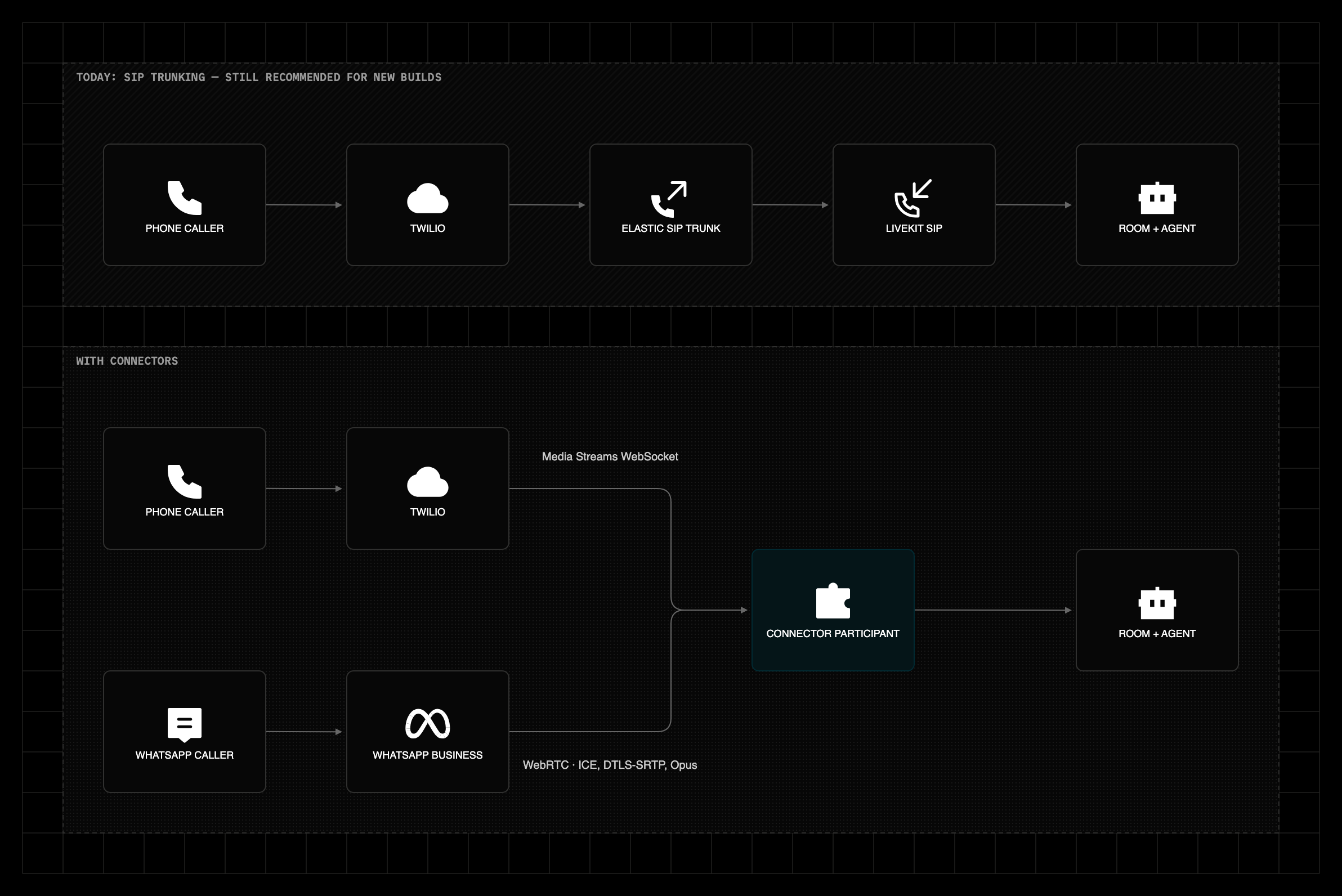
LiveKit SIP is how most agents reach the phone network, and it isn't going anywhere. But SIP isn't the best option for two groups of builders. WhatsApp isn't a phone network at all. Its Business Calling API opened to businesses in July 2025, and it speaks WebRTC natively. Forcing those calls through telephony infrastructure adds machinery the call never needed. On the other hand, teams already running phone workflows on Twilio want the benefits of LiveKit Agents, like accurate turn detection, noise cancellation, and agent observability, without reimplementing the call flows, numbers, and regulatory registrations they already own. They want LiveKit to drop in as one more step in an existing flow. Connectors serve both groups.
"The Twilio Connector gave us another way to integrate LiveKit into our platform without forcing architectural decisions elsewhere in our stack. The integration effort on our side was minimal, and the Connector has been rock solid for us throughout beta testing and in production."
— Ryan Eldridge, CTO, Liberate
How connectors work#
Each call becomes a LiveKit participant with kind CONNECTOR. It publishes the caller's audio into the room and subscribes to your agent's audio. It also carries the platform's context:
- Twilio calls attach the call SID and your custom TwiML parameters as participant attributes.
- WhatsApp callers join with their phone number as the participant identity, plus any metadata you pass in the request.
To everything else in LiveKit, a phone call and a WhatsApp call look exactly like a browser user.
The participant model also carries into your operations. Connector calls show up in the LiveKit Cloud dashboard alongside your SIP and web sessions, with the same session logs and analytics, and the platform identifiers make it easy to trace a call from Twilio's console to the room it landed in.
The media path is native to each platform. WhatsApp calls are WebRTC end to end, with ICE, DTLS-SRTP, and Opus. The caller's audio enters the room untouched, with no transcoding step. Twilio calls arrive over a Media Streams WebSocket. The connector publishes that audio into the room in its original G.711 form and adds Opus only for subscribers that need it. Media processing respects your project's region pinning. For unpinned projects, you can pass a destination country on the request, and the call is processed in the region closest to it.
Built for agents#
Agent dispatch is part of the request. Name an agent in the API call and it's in the room when the call connects. Keypad input reaches your agent as the same DTMF events LiveKit SIP produces, so a default telephony agent works without changes.
Timing is handled for you. On outbound Twilio calls, the connector participant stays hidden until the call is answered, only then becoming visible. Your agent knows the exact moment to start talking. On inbound WhatsApp calls, the connector doesn't pick up until your agent is in the room and publishing, so the caller is never connected to silence. Warm transfer support for connector calls is planned in LiveKit Agents soon.
What you can build#
- WhatsApp-first support: serve the markets where businesses rely on WhatsApp calls with the same agent you run for phone calls.
- Outbound reminders and confirmations: business-initiated WhatsApp calls in the countries where Meta supports them, and outbound Twilio calls everywhere.
- Agents that navigate phone trees: on Twilio calls your agent can send DTMF tones. It can dial an IVR, press 3, and wait on hold so your users don't have to.
- Voice and text on one channel: mid-call, the same WhatsApp Business number can send the invoice or the confirmation link. The user never switches channels.
The Twilio connector and SIP#
If you're starting fresh, use LiveKit SIP with elastic trunking. It stays our recommended path for Twilio. Media rides UDP, which provides a real latency advantage, trunking works with any provider, and LiveKit manages the call lifecycle, including routing. Dispatch rules decide which room and which agent every call reaches — and if you don't want to bring a provider at all, LiveKit Phone Numbers gives you a number in minutes.
The connector inverts that model. Your webhook answers Twilio's request, names the room and the agent explicitly, and returns TwiML. Call control never leaves the Twilio Voice API. Routing is more restricted as a result. There are no dispatch rules to lean on, and each call goes to the room your webhook names in the request. If your call logic already lives in TwiML and Studio, the connector adds LiveKit to it without a trunk, without IP allowlists, and without credential lists.
"SIP may seem like the obvious choice, but with the landscape of the telephony industry today, our clients are sometimes charged a huge premium for SIP functionality. The Twilio Connector allows us to connect directly to their existing setup using regular old PSTN / Programmable Voice."
— Cars Chandler, Lead Engineer, Transform9
Getting started#
Point your Twilio number's voice webhook at your server, and connect the call:
1const res = await api.connector.connectTwilioCall({2twilioCallDirection: ConnectTwilioCallRequest_TwilioCallDirection.INBOUND,3roomName: `call-${callSid}`,4participantIdentity: from,5agents: [new RoomAgentDispatch({ agentName: 'support-agent' })],6});
Return the WebSocket URL it gives you inside a <Connect><Stream> TwiML verb:
1<?xml version="1.0" encoding="UTF-8"?>2<Response>3<Connect>4<Stream url="${res.connectUrl}" />5</Connect>6</Response>
The call is now in the room with your agent. That's the whole integration.
"It's scaled really nicely with our customers' workload without having to change a single thing."
— Will Chertoff, Co-Founder, Clerk AI
WhatsApp is one step more. Meta sends a call event to the webhook you registered with your WhatsApp Business app, and you pass its SDP offer to LiveKit's AcceptWhatsAppCall API. The connector APIs are available in our Node.js, Python, Ruby, Go, Kotlin, and Rust server SDKs.
Your accounts, your data#
Connectors work with your own Twilio account and your own WhatsApp Business number. Your phone numbers, call logs, and regulatory registrations stay where they are. The platform credentials you pass are held in memory for the duration of the call and are never stored or logged. Connectors never record media. Audio is streamed and bridged, and it's never written to disk.
Looking ahead#
Twilio and WhatsApp are the first two connectors. The same framework extends to other platforms, including contact center suites. If there's a platform your agents should answer on, we want to hear about it.
Connectors are generally available today on LiveKit Cloud. Connector minutes are priced the same as SIP ($0.004 per minute on Ship, $0.003 on Scale), and every plan includes concurrent connector calls: 5 on Build, 20 on Ship, and 100 on Scale.
The Twilio connector docs and WhatsApp connector docs cover setup end to end.
Connectors are our first step toward agents that answer wherever people already talk, not just on the numbers you route to them. We're excited to hear where your agents pick up next. Tell us what you build, and what platform you want next, in the Telephony category of the LiveKit Community.