Given the number of solutions today (including LiveKit), and how easy it's gotten to code with AI, pretty much anyone can get a demo voice agent running in a matter of minutes. In fact, tens of thousands of developers (and some non-developers) get agents up and running on LiveKit each month.
However, this guide isn't just about helping you get a voice agent up and running. It's meant to share the years of experience our solution architects and forward deployed engineers have gained helping clients turn their POCs into live production agents that serve millions of minutes of AI voice agent conversations.
AI voice agent production readiness comes down to 3 questions#
In the next sections, we'll walk you through some recommendations for tackling each bucket of requirements and some tips our engineers have learned implementing AI voice agents.
- Is the agent smart and natural-sounding enough to converse with our users?
- Will we be able to figure out how it's doing in production?
- Did we build it in a way that we can reliably and cost-efficiently scale it?
7 ways to build a smart and natural-sounding voice agent#
1. Optimize the agent's first response as much as possible#
When I took tennis lessons in college, my coach said that if you want to be great, you should spend most of your practice time on one stroke: the serve. It's the only shot you control from start to finish, and it sets up the rest of the point.
Your voice agent's first response works the same way. Getting the first few seconds of a call right is the number one concern one of our forward deployed engineers hears from teams going to production. And it's well-supported by data we've seen in the field. After measuring, one company found that around 3 out of 4 calls ended at their agent's greeting step.
Our recommendation comes down to a couple of things:
Measure the first turn on its own. Track the time from pickup to the agent's first word as its own metric, separate from your p50 and p95 turn latency. When we dug into one team's slow openings, the models weren't the problem. Before the agent could speak, it was waiting on an HTTP call to choose its opener that alone took almost an entire second. Moving it out of the way was some of the cheapest latency we've ever found.
Load only what the agent needs to say hello, and fetch the rest while it talks. Split your context into two buckets. Bucket one holds the minimum needed for a good greeting, often just the caller's name. Pass it in with the call, through job metadata, room metadata, or a SIP header, so the agent never waits on a lookup. Meanwhile, bucket two holds everything else, and it starts loading while the agent greets the caller.
1# This code shows how to greet the caller by name while their full record loads in the background23import asyncio4import json56from livekit.agents import Agent, AgentServer, AgentSession, JobContext, function_tool789class SupportAgent(Agent):10def __init__(self, customer_record: asyncio.Task[dict]) -> None:11super().__init__(instructions="You are a friendly support agent. Keep replies short.")12self._customer_record = customer_record1314@function_tool()15async def get_account_details(self) -> dict:16"""Look up the caller's account, plan, and recent orders."""17return await self._customer_record # usually loaded long before the caller asks181920server = AgentServer()212223@server.rtc_session(agent_name="support-agent")24async def entrypoint(ctx: JobContext):25# Bucket one: just enough to greet, passed in with the dispatch26metadata = json.loads(ctx.job.metadata)2728# Bucket two: start the slow lookup now, but don't wait for it29customer_record = asyncio.create_task(load_customer_record(metadata["customer_id"]))3031session = AgentSession() # stt, llm, tts32await session.start(room=ctx.room, agent=SupportAgent(customer_record))33session.generate_reply(34instructions=f"Greet {metadata['first_name']} by name in one short sentence."35)
Keep the first sentence short and the important part first.
2. Handle turn-taking and interruptions like a human does#
It's immensely frustrating to chat with an AI voice agent (or a human, for that matter) if they keep interrupting you at the wrong moments or continue rambling on about something that isn't relevant to you. To counter this poor experience, most teams bringing an agent to production use a turn-taking model like LiveKit's turn detector, paired with adaptive interruption handling so a quick "uh-huh" doesn't cut the agent off.
It's one line: turn_detection=inference.TurnDetector(). It's also the default, so AgentSession turns it on even if you leave the line out, and it adds adaptive interruption handling whenever your speech-to-text model supports it.
Unfortunately, a set-and-forget turn-taking model isn't always perfect for every use case. Our solution architects and forward deployed engineers recommend testing long mid-sentence pauses, short answers like "yes" or "no," and interruptions in every language you support before you launch. If you spot any gaps, override only the setting that fixes what you heard and leave everything else at its default:
1# This code shows how to turn on LiveKit's turn detector and tune it only if testing finds gaps23from livekit.agents import AgentSession, TurnHandlingOptions, inference45session = AgentSession(6# ... stt, llm, tts7turn_handling=TurnHandlingOptions(8# LiveKit's turn detector (on by default)9turn_detection=inference.TurnDetector(),10# Optional: uncomment only to fix a gap your testing finds11# endpointing={"min_delay": 0.6}, # wait longer when callers pause mid-thought12# interruption={"min_words": 2}, # don't stop for a cough or a lone "yeah"13),14)
For the full list of options and which symptom each one fixes, see the turn-taking tuning guide or Configuring turn detection and interruptions in LiveKit Agents.
If you don't have a native speaker on hand to test pauses, LiveKit Agent Simulations with voice are a helpful place to start.
3. Avoid unnatural dead air#
It's pretty normal for a human customer service agent to be on the phone with you and take a second to think about an answer, look something up, or take action. But when they do pause, you're generally confident they're still on the line, and they're usually clear about what they're doing.
AI agents also need some time to think, look something up, or take action (especially if they're working with legacy systems), but how you tune the agent to handle and minimize dead air can make a big difference.
The three most common ways to do that are:
Use fast AI models that get the job done. Throwing in the LLMs you're familiar with (like the latest ones from OpenAI or Anthropic) isn't always the right choice. In fact, in many cases, our solution architects recommend against using them. For example, Gemma 4 31B on LiveKit Inference can often get to the right answers and tool calls with far less thinking time and latency than more general-purpose models. A couple of our clients shifted from GPT-4.1 to Gemma and saw a 300–500ms savings at p50 while still having the agent pass all evals. You can compare models yourself on the LiveKit Inference latency benchmarks.
Time to first token on identical requests, from the Gemma 4 launch benchmarks (July 2026). Lower is faster.
- Gemma 4 31B · LiveKit192 ms
- GPT-5.5966 ms
- GPT-4.11,006 ms
- Gemini 3.0 Flash1,095 ms
Call long-running tools asynchronously. Our forward deployed engineers work with companies of all shapes and sizes, and many of them run into a system that takes seconds to respond. When you know a lookup is going to take a while, you can make the tool asynchronous so the agent keeps the conversation going while the work runs. Done well, it can multitask better than a human. Here's how a call plays out with an async lookup:
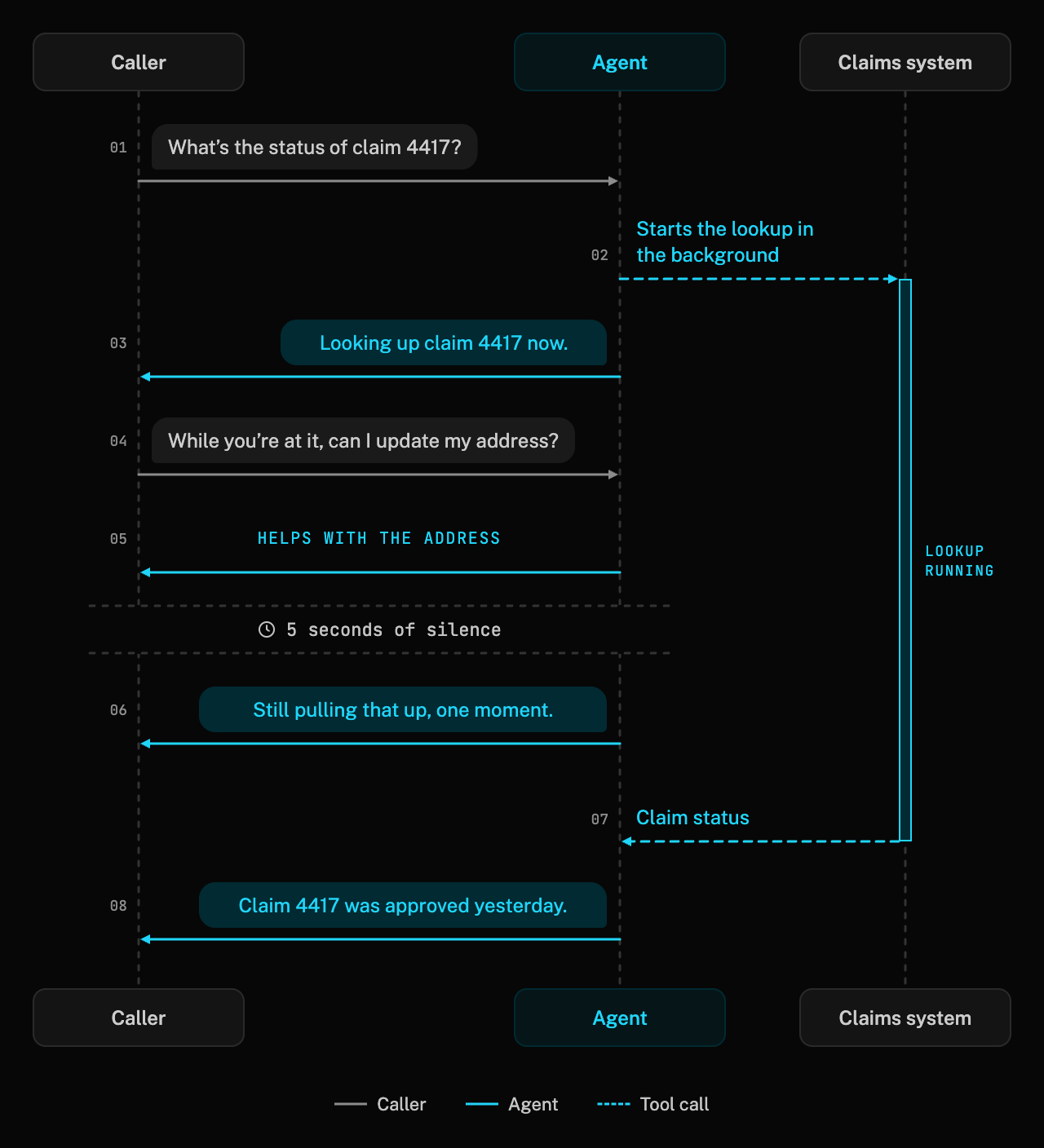
See sequence digram
1sequenceDiagram2participant C as Caller3participant A as Agent4participant S as Claims system5C->>A: "What's the status of claim 4417?"6A->>S: Starts the lookup in the background7A->>C: "Looking up claim 4417 now."8C->>A: "While you're at it, can I update my address?"9A->>C: Helps with the address10Note over C,A: 5 seconds of silence11A->>C: "Still pulling that up, one moment."12S-->>A: Claim status13A->>C: "Claim 4417 was approved yesterday."
1# This code shows how to keep talking during a slow lookup instead of leaving dead air23from livekit.agents import RunContext, function_tool456@function_tool()7async def check_claim_status(ctx: RunContext, claim_id: str) -> str:8"""Look up a claim in the claims system. This can take 10 seconds or more."""9# The first update makes the tool non-blocking: the agent acknowledges the request,10# and the conversation keeps going while the lookup runs in the background11await ctx.update(f"Looking up claim {claim_id} now.")1213# If the line goes quiet for 5 seconds, the agent says this instead of leaving dead air14async with ctx.with_filler("Still pulling that up, one moment.", delay=5):15claim = await claims_api.get_claim(claim_id)1617# Voiced as a follow-up reply once the lookup finishes18return f"Claim {claim_id} is {claim.status}."
Be careful about prompt size and caching. One of the cheapest fixes for slow responses that our solution architects and forward deployed engineers help with is optimizing the size of the prompt and caching it properly. For context, the difference between a small prompt (~2k tokens) and a large prompt (>15k tokens) can be up to ~500ms at p50 and a full second at p95. Caching can be as simple as reordering a prompt: one of our internal tests found a 38% latency improvement just by moving the static content to the top of the system prompt.
For more ways to find and cut latency across the pipeline, see Understand and improve voice agent latency.
4. Help your agent listen to the customer without getting distracted by background noise#
It's pretty clear to a human whether the person on the other end of the call is talking or it's background noise from Love Is Blind: Sweden on their TV. To an agent, it's not always clear, and we've seen cases where an agent has a very confused conversation with someone's background TV or accidentally cancels out the user's voice altogether. There are a number of ways to guard against this in production, and we've documented them in LiveKit noise cancellation: what it is and how it works.
One of the things we see with teams going into production is that they didn't test the agent in
background noise scenarios. You can run your scenarios with background
noise on
LiveKit using lk agent simulate audio --scenarios scenarios.yaml --background-noise.
5. Give your voice agent the right accent for your region and expressions for the context#
There's something uncanny about a voice agent that delivers every line in a deadpan monotone and never takes a breath, or a voice agent for a Mexican bank speaking with an accent from Spain. These issues tend to show up late when you're delivering a multilingual agent meant to span many regions.
Getting a voice agent to be expressive on LiveKit is easy if your TTS provider supports it. Turn on expressive mode and the LLM adds emotion, pacing, and non-verbal sounds inline, matched to the moment:
1# This code shows how to make the agent's voice expressive with a single setting23from livekit.agents import AgentSession, inference45session = AgentSession(6stt=inference.STT(model="assemblyai/universal-3-6-pro", language="en"),7llm=inference.LLM(model="google/gemma-4-31b-it"),8# Needs a LiveKit Inference TTS that supports expressive mode9tts=inference.TTS(model="inworld/inworld-tts-2", voice="Ashley"),10# The LLM adds emotion, pacing, and breaths. Tags are stripped from the transcript.11expressive=True,12)
Try it yourself: tell the agent some good news or some bad news, then toggle expressive mode off to hear the same agent flat.
Tell it some good news, or some bad news, and listen to how the delivery changes.
Getting the right accent can be a bit trickier. The first place our team generally recommends you focus your testing is picking a voice built for the locale. It sounds obvious, but it's important to know whether your vendor supports all the locales you need so you can switch automatically when needed for a bilingual agent.
1# This code shows how to build a bilingual agent that replies in the caller's language23from livekit.agents import Agent, AgentSession, inference45session = AgentSession(6# "multi" transcribes English and Spanish, including mid-conversation switches7stt=inference.STT(model="deepgram/nova-3", language="multi"),8llm=inference.LLM(model="google/gemma-4-31b-it"),9# A Mexican Spanish voice. Leaving `language` unset lets the TTS detect it on each reply.10tts=inference.TTS(model="inworld/inworld-tts-2", voice="Diego"),11)1213agent = Agent(14instructions="Reply in the caller's language. When speaking Spanish, use Mexican Spanish."15)
If you need tighter control, such as a different voice per language, see Build a multilingual voice agent that automatically switches languages.
In some cases, matching the entire STT, LLM, and TTS pipeline to the right language and locale helps. For example, a phone number spoken in British English can be transcribed differently from one spoken in American English, which affects how the agent reads the number back.
6. Intelligently clean up spelled-out information#
The key here is "intelligently." Nothing is worse than panic-spelling "M as in Michael, I as in icicle, C as in cat?" It shouldn't take five minutes of back-and-forth with your agent to get the right information pulled up.
Our team's approach usually has three parts:
Hear the spelling correctly without cutting the caller off. Spelling is full of pauses, and an agent that treats every gap as the end of a turn will jump in after "M-I-C." LiveKit's turn detector understands that a caller mid-spelling isn't done talking, and you can give it a little more patience (a higher min_delay) for the moments that need it.
Clean it up with a dedicated step instead of the main prompt. Don't make your main prompt do this job. LiveKit's prebuilt tasks (GetNameTask, GetEmailTask, GetPhoneNumberTask, GetAddressTask, and more) are built for exactly this: they turn "john dot doe at g mail" into john.doe@gmail.com and remember what the caller already said so they never ask twice. Additionally, you can add an agent tool that fuzzy-matches against your records for some cases.
1# This code shows how to collect a spelled-out email address in a dedicated step and confirm it23from livekit.agents import Agent, function_tool4from livekit.agents.beta.workflows import GetEmailTask567class SupportAgent(Agent):8@function_tool()9async def collect_email(self) -> str:10"""Collect the caller's email address to look up their account."""11# Normalizes "john dot doe at g mail" and reads it back once to confirm12result = await GetEmailTask(chat_ctx=self.chat_ctx)13return f"The caller's email is {result.email_address}."
Read it back once in a form the caller can check. In many cases, one clean confirmation beats three rounds of guessing, so our team often recommends having the agent read it back letter by letter, saying "dot" and "at" out loud: "That's j o h n dot d o e at gmail dot com, right?"
And for anything numeric, like account numbers, PINs, or confirmation codes, let callers use the keypad. LiveKit agents accept keypad presses and spoken digits interchangeably, so nobody has to read a 12-digit number out loud.
7. Keep your agent on script#
In March 2026, someone posted that Chipotle's chatbot would happily write Python. They asked it to reverse a linked list before placing an order, and the bot explained the algorithm, wrote working code, then politely asked what they wanted for lunch.
It's pretty funny until it's your brand (and your AI inference budget). Voice agents face the same thing: within the first day of launch, callers may start asking off-topic questions, pushing for exceptions, or trying the classic "ignore your previous instructions." And voice can be a bit trickier than text. In edge cases, your agent can slip in ways callers hear: reading a function call aloud, switching languages mid-sentence, or rambling through a 30-word answer to a yes-or-no question.
Here are four ways we've helped teams tackle this:
Write the prompt for the model you're running. Every model goes off the rails in its own way, so a prompt that works on one won't always carry over to another. In our experience, fast models like Gemma do best with explicit, prescriptive rules ("do this, never do that"), while larger general-purpose models do better when you describe the goal and let them work out the steps. Whichever you use, name the specific things it must never say out loud. For subtler slips, such as switching languages, use LiveKit Observability to trace the turns where the slip happens, track how often it happens, and tighten the prompt around those turns.
Be careful with examples in your prompt. Models tend to over-rotate on them, repeating the example phrasing word for word or forcing every conversation into the example's shape.
Validate in code instead of the system prompt (when it makes sense). The more rules you put in the prompt, the more chances the model has to get one wrong. Anything that has a right answer belongs in a tool. Verifying a date of birth is a good example: LLMs are notoriously bad at dates, so instead of asking the model to compare "March 3rd, '85" to a record, have it call a verify_date_of_birth tool and let your code return a yes or no. The same goes for eligibility checks, account lookups, and business rules.
1# This code shows how to check a date of birth in your code instead of trusting the model23from datetime import date45from livekit.agents import Agent, function_tool678class VerificationAgent(Agent):9def __init__(self, dob_on_file: date) -> None:10super().__init__(11instructions=(12"Ask for the caller's date of birth, then call verify_date_of_birth. "13"Don't discuss the account until it returns Verified."14),15)16self._dob_on_file = dob_on_file1718@function_tool()19async def verify_date_of_birth(self, year: int, month: int, day: int) -> str:20"""Check the caller's date of birth against the account on file.2122Args:23year: Four-digit birth year, for example 1985.24"""25# The model only extracts the date. Your code decides whether it matches.26dob = self._dob_on_file27if (year, month, day) == (dob.year, dob.month, dob.day):28return "Verified."29return "Not verified."
Say less. LLMs are trained to be thorough, which is fine in a chat window but feels endless on a call. Not to mention every extra word costs money. On one forward deployed engagement, our engineers compared the agent with the competitor it was replacing and found it averaged about five more words per turn. Trimming wordy recovery steps turned out to be the biggest lever on total call length.
For high-stakes calls, let a second model keep watch. In some rare cases where you need a conversation to be very fast but you can't sacrifice the intelligence of a smart model, our forward deployed engineers recommend an observer pattern: a fast model handles the conversation, while a smarter model listens in the background and quietly steers the agent's next turn if needed. The observer doesn't block speech, so callers never hear the checking happen. There are major tradeoffs to consider, though. For example, the observer can only correct the next turn, not the current one; running two models costs more; and the added complexity is usually a stopgap, not a long-term design.
3 ways to set yourself up for success observing your voice agent in production#
Shipping your agent to production, even to a small slice of traffic, can be both an exciting and nerve-wracking experience. No matter how many scenarios you've tested or best practices you've followed, once you launch, you're bound to find opportunities for improvement from a latency, intelligence, or conversational flow perspective.
The teams that have the smoothest first week in production decide ahead of time what they're allowed to record and what "good" looks like, and they have everything set up so they can quickly root-cause a problem when a call doesn't go perfectly.
1. Decide what you're allowed to record before you record it#
Make sure what you're recording follows your data residency, PII, and data retention requirements.
Double-check your observability region (if needed). If you're using LiveKit Cloud for observability, your project's data region decides where traces, logs, metrics, transcripts, and recordings are stored. Today that's the United States (the default) or the European Union (Frankfurt). It's set when you create the project.
Turn on PII redaction (if necessary). LiveKit can remove personal information from transcripts, audio, and telemetry before it's stored: spoken details become a beep, and text becomes a redaction marker. It's off by default and included with LiveKit Observability at no extra cost.
2. Hypothesize what "good" looks like before you launch (and make sure you're set up to measure it)#
Voice agents can be complex systems, and it's easy to get "lost in the logs" after deployment. To help focus your first days in production, we recommend focusing on a few things.
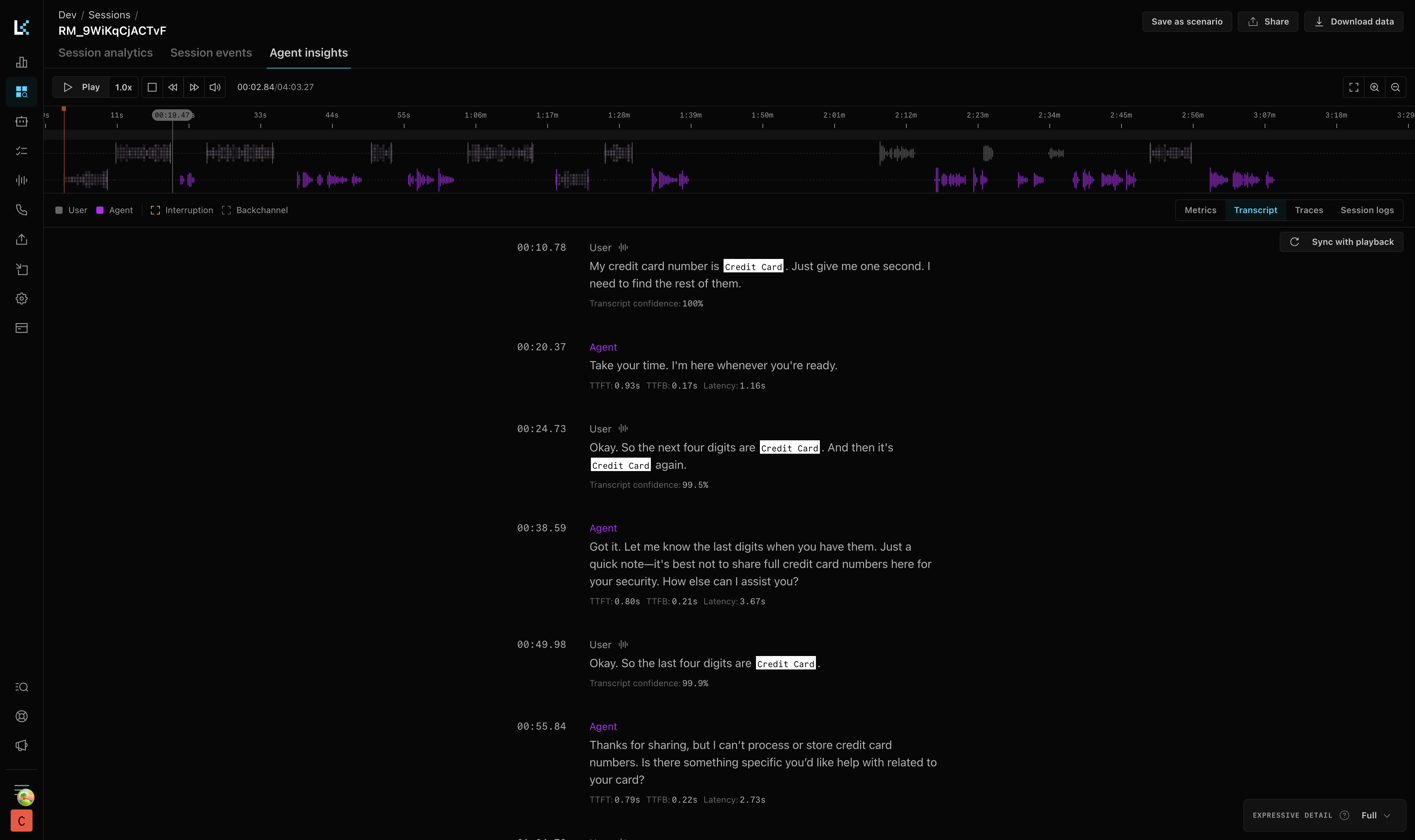
How fast it feels. Our engineers typically look at end-to-end latency at p50 and p95, plus the first turn of the call. LiveKit Observability reports e2e_latency on every agent turn. You can inspect it call by call in Agent Insights (it's the latency under each agent reply in the screenshot above), see p50/p95/p99 in audio simulations before you launch to get a rough idea, and export it to the tools you already use to track percentiles across all your production calls.
Whether it does the job. Pick an outcome that matches what you built. The goals for an outbound agent, a customer service agent, and an AI interviewing agent differ, so there isn't a one-size-fits-all answer. Whatever you choose, our FDEs suggest making it something you can count, rather than something you can only judge from transcripts. If success means handing a qualified lead to a person, the transfer_to_human tool call is your conversion event. Track what happens after the handoff too, such as whether the lead arrives warm or cold.
If you do use an LLM to grade calls, keep the scale small. We've found models are inconsistent graders on a 0–100 scale, but they tend to do better on a 0–7 or binary scale.
3. Make sure you can find and cluster edge cases from your transcripts#
It's common when developing voice agents to fall into testing the same conversations over and over until they're all consistently successful, but in nearly every case we've seen, you'll inevitably find edge cases when you go to production.
Our forward deployed engineers usually start by having an LLM sort the first few days of transcripts into clusters, then work through the clusters of edge cases one at a time, by priority.
3 ways to build a reliable and cost-efficient voice agent in production#
1. Assume every model will fail at some point#
Every model provider has outages; it's not an "if," it's usually a "when." When deploying at production scale, we recommend including fallbacks for each model. If you're using an STT-LLM-TTS pipeline, that means a fallback for each stage. In the LiveKit Agents framework with LiveKit Inference, this is usually a quick line or two. And don't stop at the STT-LLM-TTS pipeline: consider your tools as well if they make LLM calls.
1# This code shows how to add a backup for every model so a provider outage doesn't end the call23from livekit.agents import AgentSession, inference, llm45session = AgentSession(6# STT and TTS fallbacks run server-side in LiveKit Inference7stt=inference.STT(8model="assemblyai/universal-3-6-pro",9fallback=[{"model": "deepgram/nova-3"}],10),11# LLM fallbacks run in your agent process, tried in order12llm=llm.FallbackAdapter(13[14inference.LLM(model="google/gemma-4-31b-it"),15inference.LLM(model="openai/gpt-4.1-mini"),16]17),18tts=inference.TTS(19model="inworld/inworld-tts-2",20voice="Ashley",21fallback=[{"model": "cartesia/sonic-3", "voice": "9626c31c-bec5-4cca-baa8-f8ba9e84c8bc"}],22),23)
Before launch, "break" your primary provider on purpose in staging: give it a bad API key or block its hostname, then run a few test calls, including one where you break it mid-conversation. If what you hear is silence instead of a slightly different voice, your fallback isn't done.
2. Make sure your backend is set up to handle scale#
It's logical to think you need to run a massive load test before launching, but our forward deployed engineers, who have helped enterprises deploy hundreds of voice agents at scale, usually say it isn't necessary.
LiveKit Cloud scales with you, so a load test of the media and agent layers can end up being a waste of budget. Instead, they recommend testing each of the pieces you own and making sure they're set up correctly and with the right limits: your backend databases can handle many connections, your APIs can handle the request volume, and, if you're not using LiveKit Inference, your model providers are set up for your concurrency expectations.
3. Know what a conversation costs before you scale it#
It's tempting to build your voice agent with all the freshest models you're familiar with in your daily life, but when you scale that up to tens or hundreds of thousands of minutes a month, costs add up. And when you go back to switch out models, you might need to add new tools, guardrails, or prompts, because every model has its own quirks.
As of October 2026, our team generally recommends Gemma 4 31B on LiveKit Inference. It's fast, good at tool calling and following instructions, and very cost-effective, coming in about 5–7x cheaper per token than GPT-4.1. See the voice model capability benchmarks and Inference pricing to compare.
Don't let this list keep you from shipping#
We packed a ton of advice into this guide. Every recommendation here comes from real deployments: conversations with enterprise teams, weeks spent digging through call data, and fixes that made a measurable difference in production. But it's also specific. Some of it will matter a lot for your use case, and some of it won't matter at all.
So don't treat this as a checklist you have to finish before launch. Pick the few items that matter most for your agent, get it in front of real traffic, and let actual calls tell you what to fix next. The best voice agents we've seen weren't perfect on day one. They shipped, learned quickly, and kept getting better.
If you hit something you can't solve along the way, we'd love to help. Our developer success engineers, solution architects, and forward deployed engineers help teams take voice agents from POC to production every day. Talk to our team or explore the LiveKit Agents docs to get started.